
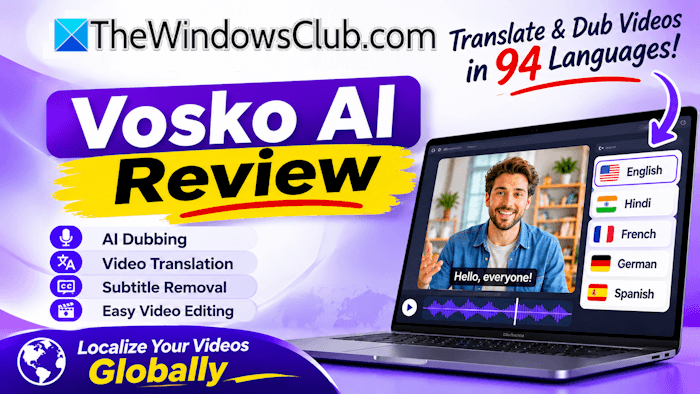
This article reviews Vosko AI, an AI video dubbing tool. Today, audience engagement and retention are the biggest challenges for video content creators. A click-worthy thumbnail can boost your video’s CTR but doesn’t guarantee strong audience engagement and retention. Our video production team faces these challenges daily. YouTube has introduced an Automatic dubbing feature for uploaded videos. If you enable this feature, YouTube’s AI will automatically dub your uploaded videos in multiple languages. Our primary observation is that the feature is held back by its robotic audio. Vosko AI addresses this limitation. It dubs your video in 94 languages in your original voice.
Vosko AI review: An AI video dubbing tool
If you have ever watched a video on YouTube with the Auto-dubbed feature enabled, you have probably noticed that the voice sounds robotic. The robotic sound irritates the viewer, due to which he loses interest, close the video, and move on to the next channel to watch the same video. This behavior of the viewer reduces audience retention and engagement and impacts the video’s performance. As a result, YouTube’s algorithm stops promoting the video, killing its reach. Vosko AI is an AI video dubbing tool that lets you dub your videos in 94 supported languages. The dubbed videos no longer sound robotic, which is its biggest advantage.
Apart from YouTube, content creators also work on other social media platforms, including Instagram and Facebook. For now, the social media platforms other than YouTube do not have an Auto-dub feature. As a result, creators rely on AI tools for video language dubbing. ElevenLabs is an excellent AI platform for video dubbing, but it consumes too many credits, which makes it too expensive, especially for new creators. Therefore, finding an affordable AI video dubbing tool that provides excellent results is also a challenging task for content creators.
Vosko AI is an affordable AI video dubbing tool that provides excellent results. You can dub any videos with this platform, including marketing videos, e-learning videos, and videos for your YouTube channel. You can also upload the same dubbed video to multiple social media platforms to reach a wider audience. This is extremely helpful if you want to promote your brand outside your location.
I tested Vosko AI to dub a 30-second video in two different languages. It consumed only 100 credits and delivered the highest-quality output. On the other hand, ElevenLabs showed me approximately 7500 credits to dub the same video in only one language. This makes Vosko AI an affordable solution for AI video dubbing.
How to use Vosko AI
Vosko AI has a clean interface, making it easy for new users.
1. To start dubbing your video, select the Video Translator tab on the left. Here, you can upload or record a video. The record feature is useful if you upload your videos directly to social media platforms without editing. If your videos require editing, using the Record feature will increase your workload because you need to edit the converted video too.
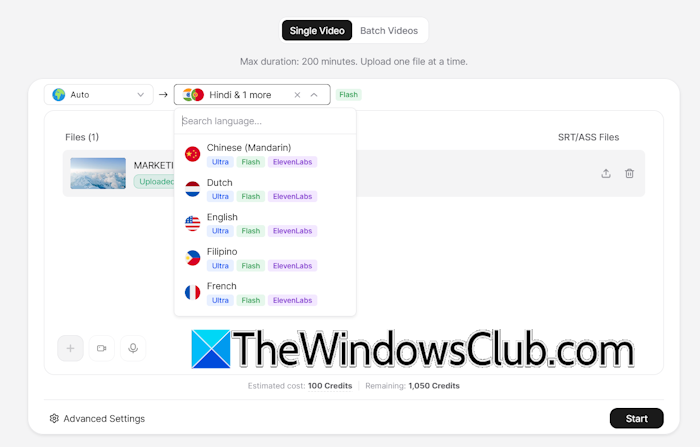
You can upload a video of up to 200 minutes for dubbing. The tool automatically detects the language of the uploaded video. However, if you want, you can manually select the language from the drop-down.
2. After uploading the video, select the language in which you want to dub the video. You can select up to 8 languages at a time for dubbing. It also shows you the estimated credits required for the video translation. When you are done, click Start. The tool will dub your video into the selected languages.
3. After dubbing the video, it shows the dubbed video in its own media player. You can play the video directly in your web browser before downloading it. The media player allows you to play the converted video at up to 2x speed.
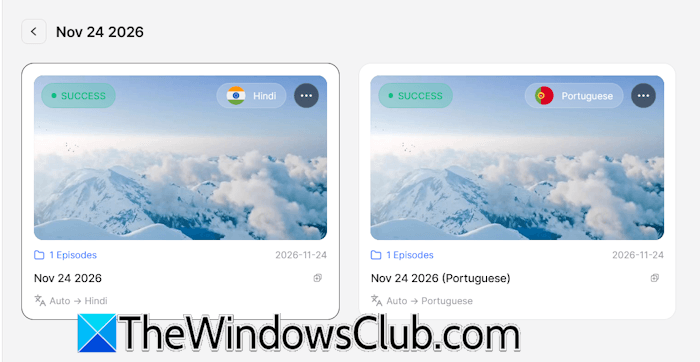
You can access all the dubbed videos under the My Projects tab. You will find two sub-tabs there: Single language and Multi language.
4. If you have selected multiple languages in one dubbing, the video will be available under the Multi language tab. You can search for the translated videos by typing their name. Additionally, you can sort your videos by applying filters, including Pending Upload, Draft, Translating, Exporting, Export Success, and more.
The platform stores your files securely for 7 days and deletes them afterwards. Therefore, download all your translated videos before they are deleted.
Key features of Vosko AI
The following are the key features of Vosko AI.
1] Batch video dubbing
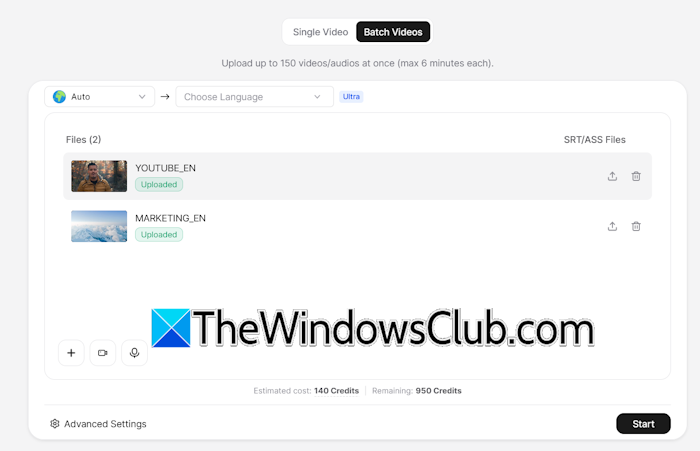
The platform offers single and batch video dubbing. If you have more than one video for dubbing in the same language, you can upload all of them for batch dubbing. The platform lets you upload up to 150 videos or audio files at once, with each file limited to 6 minutes. If your video does not have subtitles, you can upload subtitles manually. SRT and ASS are the supported formats for the subtitle files.
2] Audio and video recorder
Apart from uploading a video or an audio file to the platform, you can use the recording feature to record video or audio and convert it directly into the required language without editing. To do this, you need to grant the tool the necessary permissions. The maximum duration for video and audio files is 200 minutes for a single-file upload.
3] Video editor
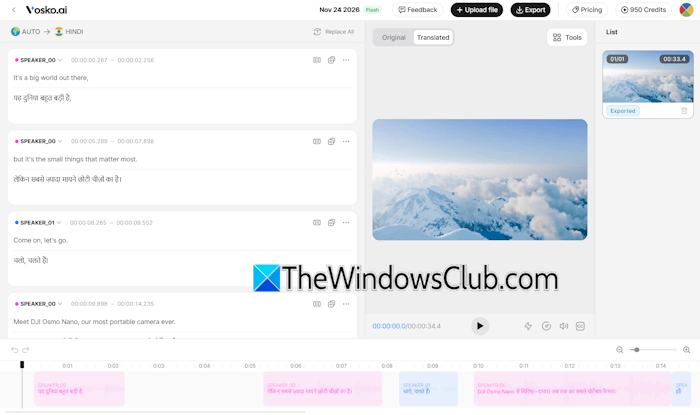
Vosko AI has a built-in video editor that allows you to edit the dubbed videos before downloading them. To access the video editor tool, go to My Projects and select a dubbed video file. Now, click Go to editor. The video editor tool will open. Here you can edit the video with the help of available tools. When you are done, click Export to download the video.
4] Advanced translation settings
This AI video dubbing tool allows you to fine-tune how your videos are translated. The following three dubbing models are available:
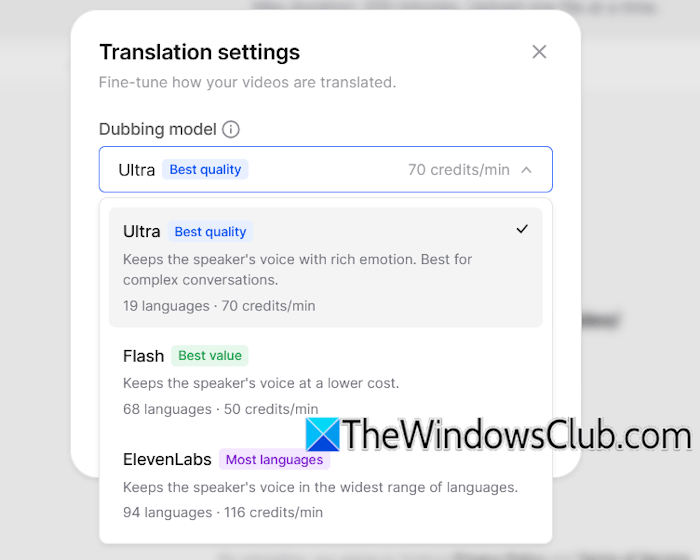
- Ultra: This dubbing model delivers the highest dubbing quality by keeping the speaker’s voice with rich emotions. It consumes 70 credits for one minute of translation and is suitable for complex conversations. Currently, this dubbing mode supports only 19 languages.
- Flash: This dubbing model delivers the best results and currently supports 68 languages. It consumes 50 credits per minute for video dubbing.
- ElevenLabs: This dubbing model supports all 94 languages and consumes 116 credits per minute for video dubbing.
You can also select whether you want to dub videos or translate subtitles only. The platform also allows you to erase original subtitles, so they would not appear in the dubbed video.
Vosko AI pricing plans
Vosko AI is available in the following 4 subscription-based pricing plans:
- Starter: 12600 credits with AI dubbing of up to 252 minutes.
- Creator: 37800 credits with AI dubbing of up to 756 minutes.
- Pro: 126000 credits with AI dubbing of up to 2520 minutes.
- Studio: 252000 credits with AI dubbing of up to 5040 minutes.
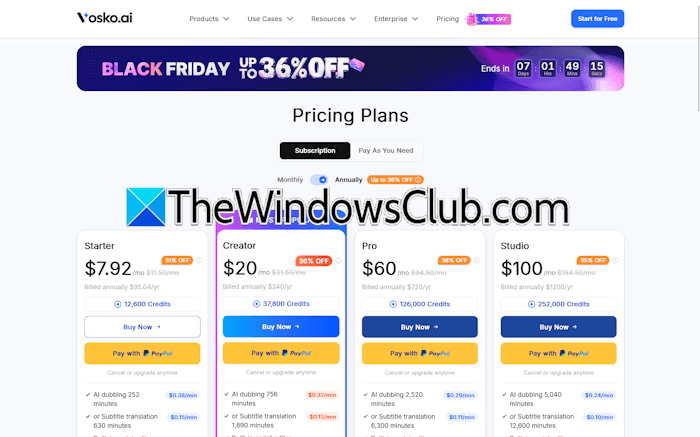
The exported video does not contain a watermark. Additionally, you can export audio and subtitle files in all these plans. The Creator, Pro, and Studio plans offer batch processing of up to 150 videos and simultaneous video translation in up to 8 languages. In addition to subscription-based pricing plans, they also offer the Pay As You Need plan.
The Black Friday Sale is live on their website, where you can get up to 36% off. For detailed information about their pricing structure, visit their official website.
We would appreciate your feedback if you are using this or a similar tool, as we are eager to understand your use cases and ideas.
Vosko AI
Overall
-
Quality of Audio Output
(4.5)
-
Performance & Functionality
(4.5)
-
Data Security and Prvacy
(4.5)
-
Integration with API & Uptime
(4.5)
Summary
Vosko AI lets you dub videos into multiple languages to improve audience retention and engagement.
Pros
- Better Quality Multilingual Dubbing like a real human.
Cons
