
Dealing with a traditional VPN can be challenging at times, as you need to configure firewall rules, manage static IPs, troubleshoot split tunneling, and more. And if you have found yourself dealing with these, then Tailscale is something you must check out.
It promises to replace all the complexity with a lightweight, identity-based mesh network that connects your devices, services, and infrastructure in minutes without exposing anything to the public internet. However, if you haven’t heard of this VPN before, this Tailscale review will walk you through everything: what it is, who it is for, how it works, and whether you should opt for it.
What Is Tailscale for Windows?
Tailscale is a connectivity platform built on top of WireGuard, which is a modern, high-performance VPN protocol. While WireGuard provides an encrypted tunnel, Tailscale adds a layer on top of it that enterprises actually need: identity-based access control, device management, automatic key rotation, and a coordination server that handles the hard parts of peer-to-peer networking.
Tailscale has a tailnet, which is basically a private mesh network where every connected device can reach every other device directly, authenticated by identity rather than network location. It kills the need for a central VPN gateway that routes all your traffic. Nor do you have to set up firewall rules to maintain it. Instead, you install a lightweight client, sign in with your identity provider, and you are all set.
The tool is trusted by thousands of organizations worldwide, which includes both home lab makers, early-stage startups, and global enterprises. Some of their clients include Instacart, Hugging Face, Cribl, and Mercury, who have published case studies on how Tailscale simplified their infrastructure.
Key features of Tailscale
Zero trust identity-based access
Every connection on Tailscale is authenticated and authorized based on user identity and device identity, verified through your existing identity provider. A device connecting from a new IP address is evaluated the same way as one sitting inside your office. Access is granted or denied based on the policies you set up, and not network location.
WireGuard-based mesh network
Tailscale uses WireGuard, which is a modern, high-performance VPN protocol known for its lean codebase, strong cryptography, and minimal overhead. However, unlike a traditional WireGuard setup that requires manual key exchange and configuration, Tailscale automates it all. Your connections between devices are peer-to-peer wherever possible, meaning traffic does not pass through a central VPN server. Instead, each device uses a direct, encrypted tunnel, keeping latency low and throughput high across your entire network.
Deploy in minutes
Setting up Tailscale is also fairly easy. All you have to do is install a lightweight client on a device, sign in with your identity provider, and the device is on your tailnet. You don’t need to set up a firewall, deal with port forwarding, or anything else. Just create an account, and you are all set.
Multi-cloud connectivity
Tailscale makes your global infrastructure feel like a single, local office. It doesn’t matter if your team runs workloads across AWS, Azure, and GCP simultaneously alongside on-premises servers and edge systems. Tailscale connects all of these into a single, unified private network.
Access Control Lists (ACLs)
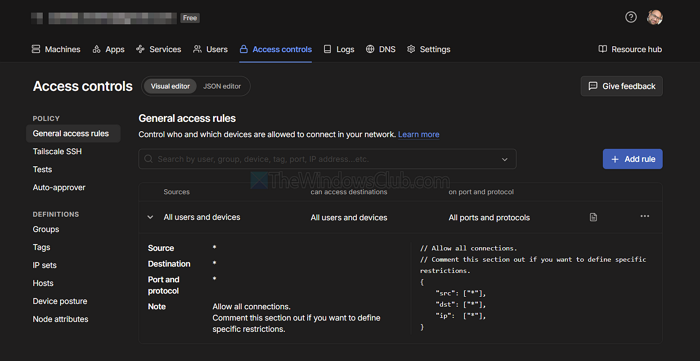
Using Tailscale’s ACL system, you can write policies in a simple, human-readable format that specifies which users, groups, or tagged devices can access which ports on which resources. ACLs are version-controlled, so every policy change has an auditable history, critical for compliance and incident response.
MagicDNS
With MagicDNS, you get a human-readable hostname automatically, so your team accesses resources by name, database, staging-api, build-runner, rather than memorizing or looking up addresses. DNS resolution happens privately within your tailnet, without leaking queries to the public internet.
Tailscale SSH
When you manage SSH access in the traditional sense, you need to distribute public keys. However, with Tailscale, you don’t need to do that. Instead, access to machines over SSH is controlled by your Tailscale ACLs and your identity provider. As a result, you don’t have to manage any SSH keys, and your port 22 won’t get exposed. Plus, you can opt for optional session recording for audit and compliance workflows.
Subnet routers
Not all devices on your network can install a Tailscale client, like printers or legacy servers. To solve this, there are Subnet Routers that allow a Tailscale-connected device to advertise an entire subnet into your tailnet. Your team gets private access to everything on that subnet without having to touch each device individually.
Exit nodes
Any tailnet device can be designated as an exit node, routing a user’s full internet traffic through it rather than straight to the destination. This is highly useful for securing browsing on untrusted public Wi-Fi, enforcing corporate internet policies for remote workers, or testing region-specific behavior.
Funnel and serve
Tailscale Serve makes a local service accessible to teammates on your tailnet by name, with no reverse proxy or firewall changes needed. Tailscale Funnel extends this to the public internet, giving you a shareable endpoint for webhooks, demos, or lightweight self-hosted apps without touching your router or cloud firewall.
Device management
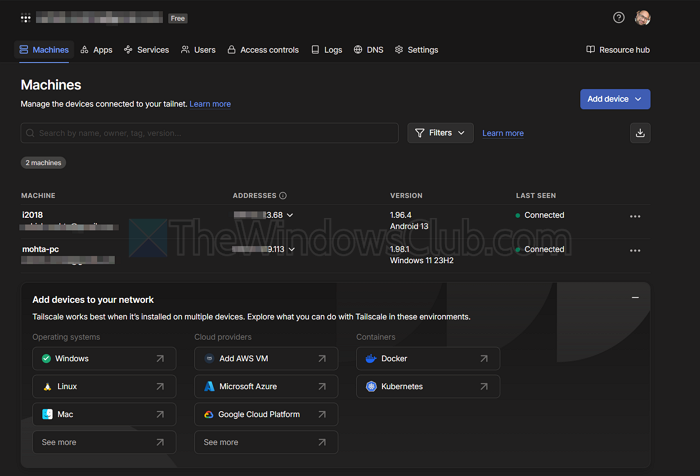
The admin console gives you a centralized view of every device on your tailnet, such as the owner, last-seen time, OS, authentication status, and applied tags and policies. You can disable, remove, or force re-authentication on any device remotely, without needing access to the device itself.
SSO and identity provider integration
Tailscale connects to the identity provider you already use, such as Okta, Azure AD (Entra ID), Google Workspace, GitHub, GitLab, and any OIDC or SAML-compatible provider. Group membership from your IdP flows directly into ACLs, so access stays in sync automatically. When an employee is offboarded, their tailnet access is revoked the moment their IdP account is disabled.
Core Use Cases of Tailscale
- Remote access to development environments: Developers on your team can securely reach internal servers, databases, and tools from anywhere without a traditional VPN.
- Multi-cloud and hybrid infrastructure: If your infrastructure is spread across AWS, Azure, GCP, and on-prem, Tailscale connects all of it into one private network your team can access seamlessly.
- IoT device management: You can manage edge and IoT devices privately without exposing them to the public internet.
- AI infrastructure connectivity: ML teams can securely access GPU clusters, training pipelines, and model-serving endpoints without opening them up publicly.
- Homelab and self-hosting: You can access your home servers, NAS devices, and self-hosted apps from anywhere securely.
- Team collaboration: Give your team secure access to shared resources without the overhead of a traditional VPN setup.
- Secure SSH access: Get rid of key sprawl and bastion hosts. Instead, Tailscale SSH gives you identity-based access to any machine on your tailnet.
- Replacing legacy VPN: Organizations stuck on slow, complex VPN appliances can migrate to a lightweight mesh network that is faster to use and easier to manage.
- CI/CD pipeline security: Engineering teams can keep build runners, artifact stores, and deployment targets off the public internet while still making them accessible to their pipelines.
- Compliance and audit: Security and compliance teams can enforce access policies, review version-controlled ACL changes, and maintain visibility across the entire tailnet.
Tailscale Pricing
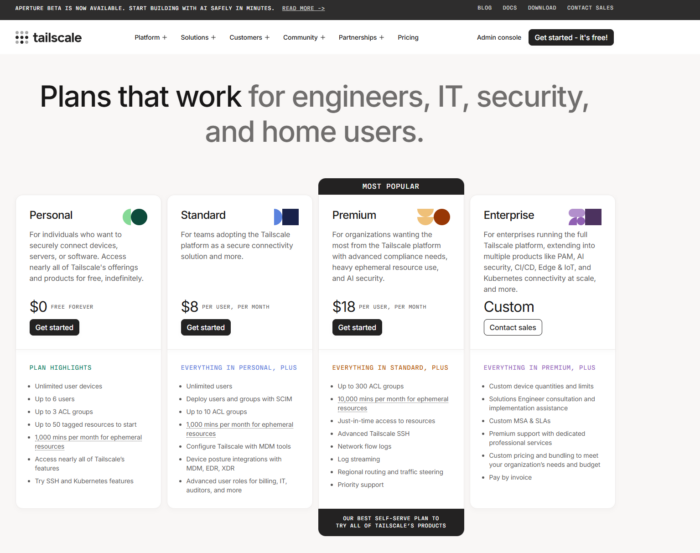
Now, coming to the pricing part, it has four different plans, including a free one. These plans are Personal, Standard, Premium, and Enterprise. While the Personal plan is available for free, the other plans cost $8 and $18 per user per month, respectively. For the Enterprise plan, you need to contact the customer team.
All plans offer unlimited user devices, ACL groups, tagged resources, a set number of minutes per month for ephemeral resources, and more.
Overall, Tailscale is a zero-trust, identity-based connectivity platform that aims to replace your legacy VPN, SASE, and PAM, and connects remote teams, multi-cloud platforms, and more. And if this is something that your current setup requires, then Tailscale is worth checking out.

Leave a Reply