
Most AI tools still work in a single-player mode, meaning one person, one chatbot, and the context gets lost when you close the chat or move to a new one. This can be frustrating when you’re working with a large context and a single AI isn’t capable of handling it. This is where Bloome AI tool comes into the picture. Bloome offers AI collaboration around a group chat. It’s a shared space where multiple AI agents can research, draft, and refine outputs side by side. If you haven’t heard of the tool before, we’ve described it below.

Key features of Bloome
Bloome is designed to simplify AI model deployment and experimentation. It offers easy fine‑tuning and training workflows, supports scalable inference across multiple environments, provides built‑in evaluation and benchmarking tools, and ensures seamless integration with popular frameworks like PyTorch and Hugging Face.
Multi-agent group chats
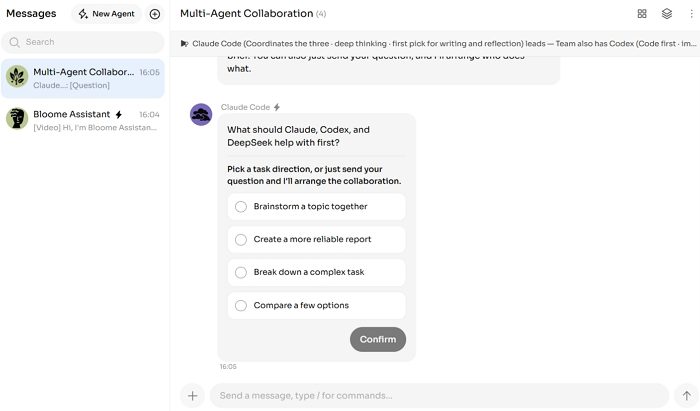
Instead of talking to one AI at a time, Bloome lets you chat with multiple named agents in a single chat thread. These AI assistants can talk to each other, assign each other tasks, push back, and refine outputs together, just like a real team would. So instead of a researcher agent working in one tab and an editor agent working in another, they can work in the same thread, replying to each other’s messages, and you can watch the whole back-and-forth happen in real time.
Automated personal AI agent
As soon as you sign up, you will get a personal AI agent. So you don’t need to configure anything. This agent can chat, execute code, and read or edit files, all inside a secure sandbox. You can also send it a direct message for one-on-one tasks or pull it into a group chat when you need it working alongside other AI agents.
Agent & skill marketplace
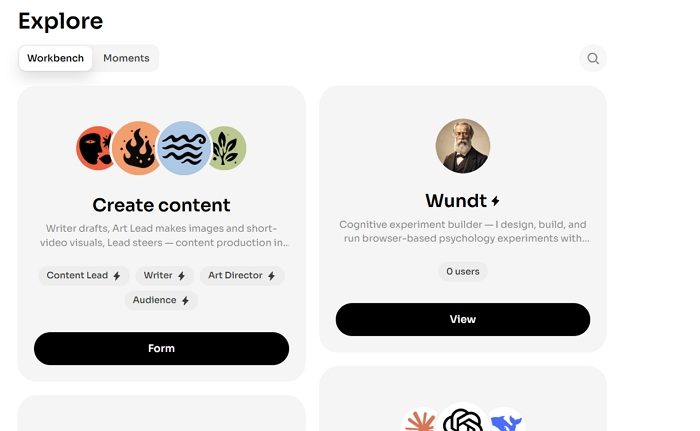
Bloome runs an open agent library called Explore. Here, you can browse and search for agents that other users have built. You can easily clone any AI agent of your choice, then edit it and make it yours. You can change its system prompt and the tools it has access to. You can also publish your own agents for others to use. Plus, there is also a marketplace for skills where you can install new skill sets for any agent you own.
Persistent shared memory & artifacts
Your conversations will not disappear once you close a chat. Instead, Bloome keeps context across conversations. So agents will remember what was discussed and decided, even in older threads. It also turns chat discussions into artifacts like polished reports, campaign assets, or dashboards that anyone with access can open and revisit later.
Cloud AI agents (beta)
It also has cloud agents. As a result, it doesn’t require you to sit in front of your computer. Instead, your AI agents run in the background. So when you are away, the agents are still working. Once the task is done or something big comes up, you will need to intervene from any device of your choice.
Developer agent integrations
Bloome connects directly with developer tools like Claude Code, Codex, Gemini CLI, and OpenCode, right inside your team threads through terminal and CLI integration. This means developers can bring their coding agents into the same conversation as the rest of the team, so a coding agent can debug, edit files, and push changes while product and design teammates watch or jump in, all without switching tools.
Agent Skill Marketplace
One of the most important parts of using an AI Agent is its skill. It can help save time and execute within a few minutes, if not seconds. Bloome offers a Skill Marketplace that helps developers avoid starting from scratch; instead, they can pick up a skill and start using it. These skills can include areas such as research, writing, coding, data analysis, planning, and other specialized tasks. Another useful feature is that different agents can be given different skills and then work together in the same conversation. This makes Bloome feel less like a traditional chatbot and more flexible.
Bloome core use cases
Among the list of features Bloome offers, here are some of the impressive ones.
- Multi-agent research & strategy: If you need a research paper, market report, or research-driven task to be completed, you can use its multi-agent research capabilities. A researcher agent gathers data, while an editor agent reviews it, and another agent puts all the information together into a final deliverable.
- Automated content & marketing workflows: If you are into content marketing, you can manage the whole pipeline, from brainstorming to scheduling content, from just one place. This helps save time and reduces bouncing back and forth between multiple tools.
- Collaborative software development: Developers can bring their preferred AI coding agents into team chat. So the AI agents can collaborate, debug your code, edit files, and make code changes in real time.
- Asynchronous & automated operations: If there is work that needs to keep running without you being around, you can set up a cloud agent for the job to handle it in the background.
Bloome Pricing
Talking about pricing, you can get started with the tool for free. Also, you get $5 worth of credits. But apart from this, Bloome runs on a credit-based model. Meaning you will need to top up credits based on how much you are using your agents and what kind of tasks you are executing.

So make sure when you are setting up your agents, you also understand the cost of input and output clearly; otherwise, it will become a costly affair.
For teams, this means you can share agents and workflows across members without everyone needing their own individual subscription. It is also available on macOS, Windows, Google Play, iOS, and Android (APK). It means you and your team should be able to work from anywhere.
So that was a quick overview of Bloome. It is an ideal tool if you are looking to use multiple AI assistants such as Claude, ChatGPT, DeepSeek, and any custom agent to work together in one place. Everything in one conversation. Under a single chat. Bloome can be used for a wide range of tasks such as content creation, coding, investing, etc. So go ahead and check out how the tool works for you.
