
AI agents can answer your queries and generate content but cannot interact with live websites. If you want an AI agent to automate workflows, you will need a platform that provides the AI agent with the capability to do so. TinyFish is a platform designed especially for AI agents to automate workflows. It combines web search, content extraction, and automated browser sessions through a unified platform. You can use its API to give your AI applications access to live websites. This article reviews TinyFish, a platform that provides web infrastructure for AI agents. We will explore its key features, use cases, pricing plans, and more.
TinyFish review: A web infrastructure for AI agents
TinyFish is a web infrastructure platform for AI agents that enables them to search, read, navigate, and interact with live websites. The platform has tools that you can use to retrieve information and perform actions across multiple websites. Traditional web scrapers break when confronted with dynamic JavaScript, login walls, CAPTCHAs, or complex multi-step forms. TinyFish addresses these limitations with managed browser infrastructure and simple API endpoints designed for agentic execution—from automated login sequences to complex transactional tasks.
TinyFish AI Web Scraping and more!
The following are the four main capabilities of the platform:
- Search
- Fetch
- Agent
- Browser
Credits aren’t consumed when you use the Search and Fetch features. This is one of the biggest advantages of this platform. Now, let’s talk about these four main capabilities in detail.
1] Search
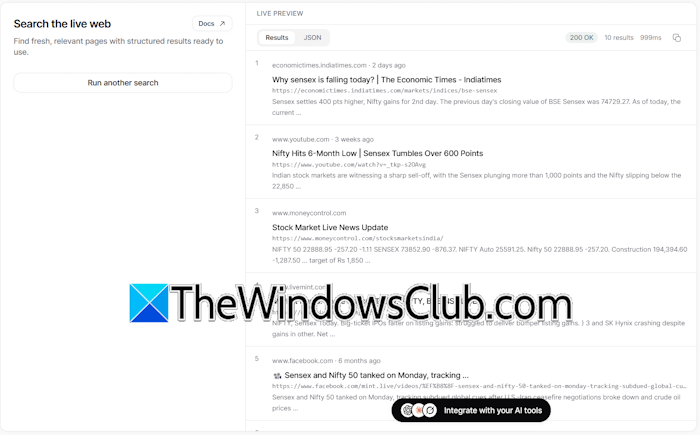
The Search feature allows you to find fresh, relevant pages with structured results ready to use. The search results are delivered in a structured format, including titles, snippets, and URLs. AI agents can use the Search feature of TinyFish to find relevant information, such as the latest news about a company and its official website. The Fetch Page feature can be used to retrieve content for the selected web pages for further analysis.
Advanced filters give you more control over Live web search. Here, you can apply filters like location, language, domains to be included and excluded, and published date range.
2] Fetch
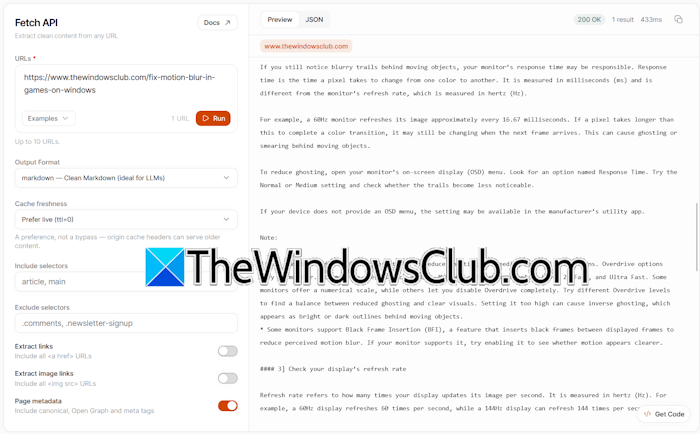
The Fetch feature allows you to extract clean content from any URL. You can extract up to 10 URLs in one go. It converts any web page into a clean output format, including HTML, JSON, and Markdown. The Include and Exclude Selectors allow you to target specific sections of a web page while filtering out unwanted clutter.
3] Agent
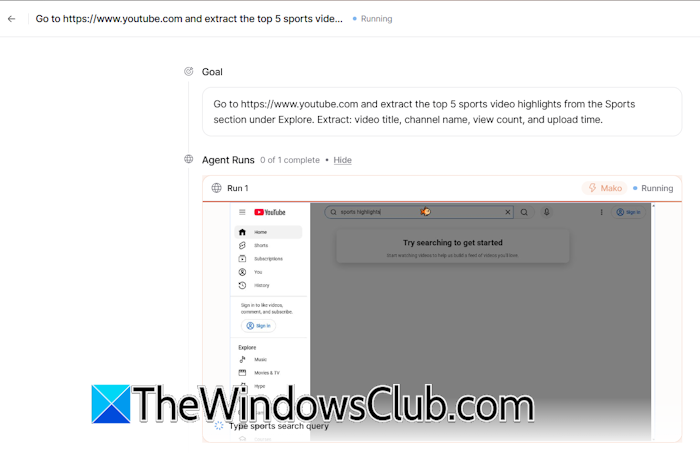
The TinyFish Agent can interact with live websites. You can give it simple to complex tasks in plain English. It can click buttons, type text, fill out multi-step forms, and navigate web applications just like a human user. While a task runs, you can view a live preview to monitor the agent’s actions on live websites. When the task is finished, you can export the result in JSON or CSV format.
4] Browser
TinyFish Browser feature provides a live cloud browser session to access websites usually inaccessible for normal web scraper tools, such as websites with login pages. You can use this feature to automate web processes. Suppose your organization needs to log into a third-party vendor website every month to download invoices. Since the portal is behind a password-protected login wall, normal web scraper tools cannot access it.
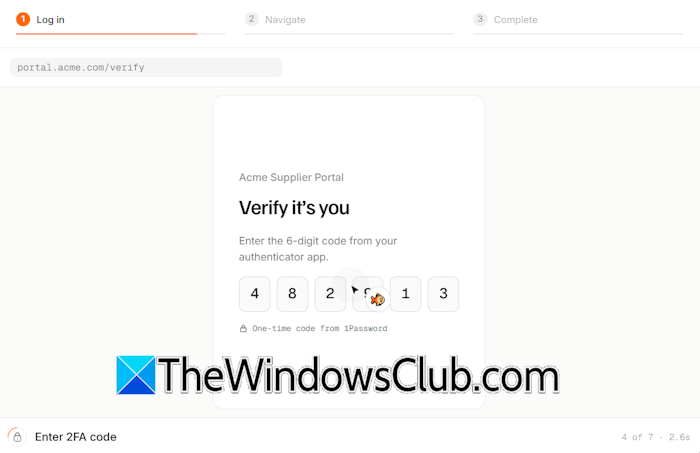
TinyFish allows you to create a managed cloud browser session. To allow the TinyBrowser to log in to the portal, you can connect your password manager, like 1Password or Bitwarden, to its security feature, TinyVault. TinyVault gives autonomous AI agents secure, persistent access to password-protected websites and login-walled dashboards without compromising security or exposing sensitive user credentials to the underlying LLM.
Key features of TinyFish
The following are some of the key features of TinyFish:
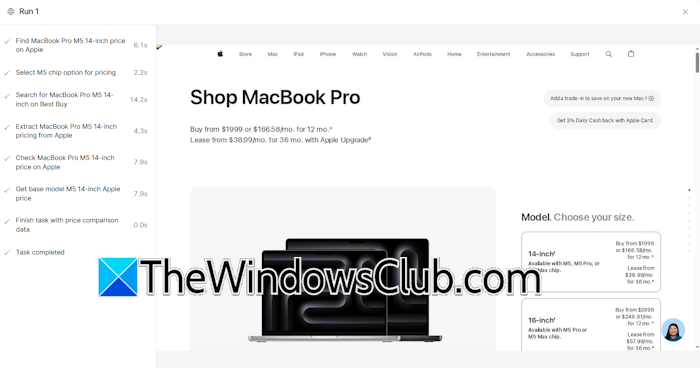
- Agentic web navigation: TinyFish enables AI agents to navigate websites and perform actions such as clicking buttons, entering text, filling out forms, and moving between pages. You just have to define a goal in plain English, and its TinyAgent will complete the entire workflow automatically. However, you need to provide necessary permissions.
- Headless browser API: TinyFish features managed cloud-based headless browsers with built-in proxy handling, session persistence, and anti-bot mitigation. The cloud browser infrastructure eliminates the need to maintain local browser instances.
- Live session inspection: Debugging a browser automation becomes difficult when a workflow fails due to an unexpected redirect, an authentication problem, a changed website layout, or an element that did not load correctly. TinyFish provides visual streams and execution logs to monitor and debug agent actions step by step. This helps developers inspect what happened during a workflow execution.
- Structured data extraction: TinyFish’s powerful tools, TinySearch and TinyFetch, enable it to pull raw page content and parse unstructured web pages into clean, structured JSON formats.
- Developer SDK and framework support: TinyFish is the toolkit for AI agents to operate the web — search, fetch, and run web automations. It offers API keys and SDKs that integrate seamlessly with Python, TypeScript, and popular AI agent frameworks. You can integrate it with any AI agent, including popular ones such as Hermes agent, Claude, Grok, OpenClaw, and Codex.
Use cases of TinyFish
Let’s see some use cases of TinyFish, a web infrastructure platform for AI agents:
- Autonomous task completion: You can use TinyFish to build agents that can complete multi-step workflows, such as booking reservations, making purchases, or filling out forms. However, tasks such as payments and purchases require human approval.
- Complex data extraction: Normal web scraping tools become useless when it comes to extracting data from dynamic websites or websites with gated authentication walls. TinyFish allows developers to scrape data from such websites without managing local headless browser instances.
- Automated web research and monitoring: TinyFish offers continuous tracking of live web pages, pricing changes, and competitor and supplier updates in real time. This feature is helpful for businesses, as they need to track dynamic information across multiple websites. You can use this feature to build an e-Commerce agent that monitors multiple e-Commerce websites to hunt down the best budget deals for customers.
- AI search and content retrieval: TinyFish serves as a live browsing layer for AI agents, research bots, and factual verification tools. This feature is helpful to build a research AI agent because the information it needs may not be present in its training data. It can use TinyFish search and fetch features to access live websites and their content.
TinyFish Pricing guidance
Currently, TinyFish offers the following two pricing plans:
- Pay as you go
- Enterprise
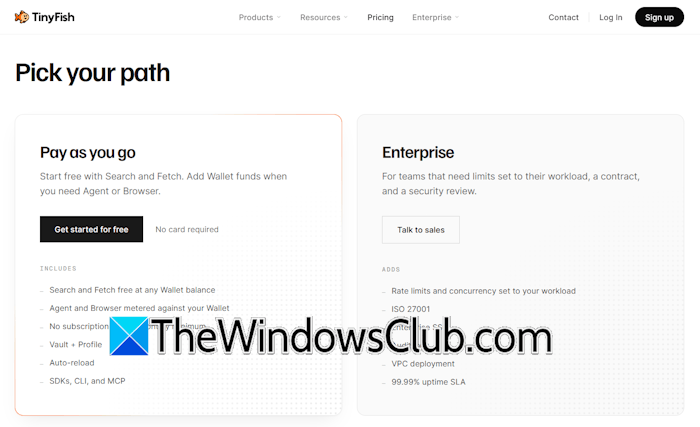
After signing up, $8 is added to your account. In addition to this, you can earn up to $5 by completing setup tasks, which is added to your wallet. The setup tasks include running your first session, generating a new API key, making your first API call, and setting up MCP integration. Getting started with TinyFish is completely free, and no card is required. The Pay as you go plan includes free search and fetch at any wallet balance, vault + profile, auto reload, Agent with a 2 concurrent run limit, browser with a 5 concurrent session limit, SDKs, CLI, and MCP. The Enterprise plan adds additional features to your account, such as audit logs, VPC deployment, etc.
To get more information about the pricing structure of TinyFish, visit the official website.

Leave a Reply