
Since the advent of AI, generating media with a prompt has become the new norm. It started with generating images, and now we have plenty of tools that can create videos. Among them, one such tool is Lovart.ai. It is the world’s first design agent AI-powered platform that converts simple text prompts into professional visual designs.
Using the tool, you can do multiple things like generate fresh concepts, create stunning visuals, or create ASMR videos. And in this guide, we are going to talk specifically about creating ASMR videos using Lovart.
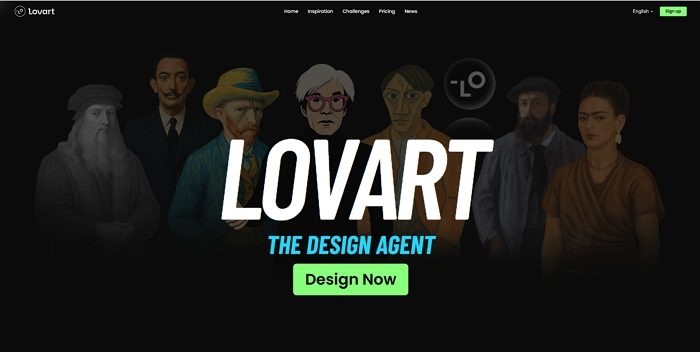
What’s Lovart?
Lovart is a powerful design agent tool that converts your text prompts into professional-quality visuals. Using the tool, you can shape brand identities, generate fresh concepts, and produce stunning content faster than ever before. It packs some of the coolest features, such as:
- Professional template library: It comes with a wide range of templates optimized for branding, from social media content to print materials. Each template follows preset layouts, spacing rules, and style guides. So even if you are not a pro designer, you will still be able to generate stunning visuals.
- Comprehensive design ecosystem: If you are a professional designer, then you can connect Lovart with a bunch of AI and traditional design tools like GPT-4o, Photoshop, and Figma so you can enjoy a smooth workflow.
- Intelligent design assistance: Lovart also offers AI-driven suggestions so you can improve your designs.
- Collaborative canvas: It also allows you to work in real time with AI capabilities and human creativity combined. So you can do continuous iteration and refine your design as you work on it.
Use Cases for Lovart.ai
Before we talk about how to use the tool, here are some possible use cases that might meet your work requirements:
- Brand development: Using Lovart, you can quickly produce complete visual identity packages with logos, color palettes, and style guidelines for your brand.
- Social media content: It maintains a consistent look and feel across all your social media posts and campaigns without compromising on speed. So your social media posts will have a consistent tone and help you present your brand online more effectively.
- Print and digital collateral: You can also use the tool to design everything from marketing brochures to website banners with consistent branding.
- Creative agencies: Streamline concept development and prototype production.
- Small business owners: Create high-quality promotional materials and assets without relying on external designers.
Steps to Create ASMR Videos Using Lovart AI
If you have ever used any tools like ChatGPT or Google Gemini, generating ASMR videos using Lovart won’t be an issue, as all you need to do is write a good prompt and you will have your video within seconds. Here’s how you can get started:
- Go to Lovart.ai and create an account.
- After signing up, you will find a text field. Over here, write a prompt of the ASMR video you want to generate. (E.g., Realistic 4K close-up of scissors cutting a wobbly jelly pizza with pepperoni and cheese suspended inside. Each snip makes a sticky “snap” sound. ASMR style, extreme slow motion.)
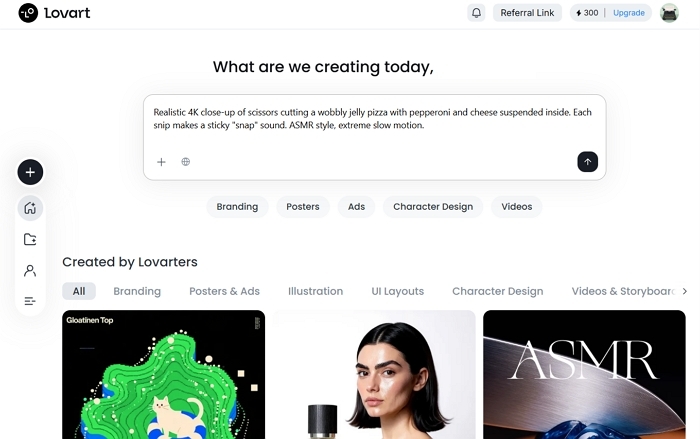
- Finally, wait for the video to get generated and edit it using prompts as per your requirements.
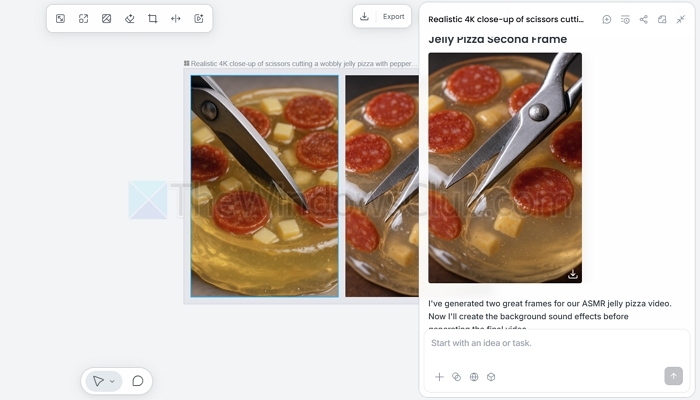
Personal Experience and Insights about Lovart.ai
Getting started with Lovart was pretty straightforward. I was able to sign up using my Google account, and it only took me 2 seconds. After that, it straightaway took me to the dashboard from where I could prompt my designs.
Learning how to use the tool wasn’t particularly difficult. The interface was pretty clean and anyone with a little knowledge of web know-how should be able to use the tool. However, writing good prompts requires talent to produce better content.
Lovart also offered great designs that looked professional and less like they were AI-generated. It delivered polished, professional visuals that closely matched my text descriptions. For ASMR-themed designs, it captured the calming aesthetic perfectly.
It also helped me with my creative process. It already had a lot of generated content with its prompts, so it helped me understand how to write my own prompts and inspired me.
Furthermore, it was easily integrated with tools like Photoshop and Figma without any issues, and the transition between platforms was seamless.
Pros & Cons of Lovart.ai
This AI-powered design platform transforms text prompts into professional, brand-ready visuals, integrating seamlessly with tools like Photoshop and Figma. It offers a collaborative, accessible ecosystem for both beginners and pros, though mastering prompts, advanced customization, and pricing may pose some challenges as it develops.
Pros:
- Revolutionary AI-powered design generation from text prompts
- Professional-quality templates optimized for real-world branding needs
- Seamless integration with popular design tools like Photoshop and Figma
- Collaborative canvas for team-based design work
- Accessible to non-designers while powerful enough for professionals
- Comprehensive design ecosystem approach
Cons:
- Still in the development stage with potential for improvements
- May require some learning curve to master prompt writing for optimal results
- Advanced customization may still require traditional design skills
- The pricing structure may not suit all budget levels
Pricing of Lovart AI
Lovart offers both free and paid plans. The free plan offers you 500 credits, which is good enough to test the tool and see if it meets your requirements.
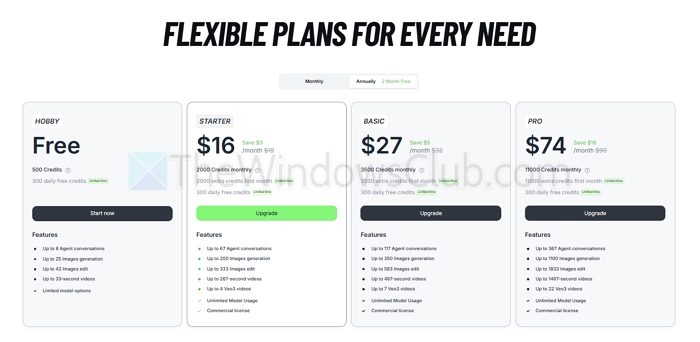
Alternatively, you can switch to Starter, Basic, or Pro plans priced at $19/month, $32/month, and $90/month, respectively. Also, if you bill annually, you will get 2 months of free access to the tool.
In conclusion, Lovart.ai is a powerful AI tool that can create ASMR visuals efficiently, plus deliver full-scale branding solutions. So go ahead and check the tool out and see how it is working for you.

Leave a Reply