
Losing important data from an iPhone can be stressful, whether it’s treasured family photos, business contacts, WhatsApp conversations, or notes you’ve been collecting for years. Data loss can occur for many reasons, including accidental deletion, failed iOS updates, factory resets, device crashes, hardware damage, or even losing your iPhone.
Although Apple provides iCloud and Finder/iTunes backups, restoring a backup isn’t always the ideal solution. A traditional restore replaces the existing data on your device with the contents of the backup, which means recently created files that aren’t included in the backup could be lost.
This is where Apeaksoft iPhone Data Recovery offers a more flexible solution. Instead of restoring an entire backup, the software allows you to scan your iPhone or existing backups, preview recoverable files, and restore only the items you actually need.
Designed for both beginners and experienced users, Apeaksoft supports a wide range of Apple devices and offers multiple recovery methods for different data loss scenarios.
In this review, we’ll examine its features, recovery modes, supported devices, system compatibility, pricing, and whether it’s worth buying in 2026.
What is Apeaksoft iPhone Data Recovery?
Apeaksoft iPhone Data Recovery is a desktop application that helps recover deleted or lost data from iPhone, iPad, and iPod touch devices. Available for both Windows and macOS, the software supports three different recovery methods depending on your situation.
Whether you’ve accidentally deleted photos, lost messages after an iOS update, experienced a system crash, or need to recover data from an iCloud or Finder/iTunes backup, Apeaksoft provides a straightforward way to retrieve important files.
Unlike Apple’s standard restore process, the software lets you recover specific files without overwriting your current device data.
Apeaksoft iPhone Data Recovery Review and Features
Apeaksoft combines powerful recovery capabilities with an intuitive interface, making it suitable for home users and professionals alike.
| Feature | Description |
| Three Recovery Modes | Recover data directly from an iPhone, Finder/iTunes backup, or iCloud backup. |
| Supports 31+ Data Types | Recover photos, videos, contacts, messages, notes, WhatsApp chats, call history, voice memos, Safari data, calendars, reminders, and more. |
| Preview Before Recovery | View recoverable files before restoring them. |
| Selective Recovery | Recover only the files you need instead of restoring an entire backup. |
| Deep Scan Technology | Performs a thorough scan to maximize the chances of recovering deleted data that hasn’t yet been overwritten. |
| Smart Search & Filters | Quickly locate deleted files using built-in search and filtering options. |
| Deleted Files Highlighted | Deleted items are clearly highlighted in red, making them easier to identify during preview. |
| Ultra-Fast Scanning | Real-time visual progress bar lets you monitor the scanning process. |
| Offline Recovery | All recovery operations are performed locally on your computer, helping protect your privacy. |
| Cross-Platform Support | Compatible with Windows XP (SP2), Vista, Windows 7, 8, 8.1, 10, 11, and macOS OS X 10.7 or later. |
Three Recovery Modes for Different Situations
One of Apeaksoft’s biggest strengths is its flexibility. Depending on how your data was lost, you can choose from three different recovery methods.
- Recover Directly from an iPhone
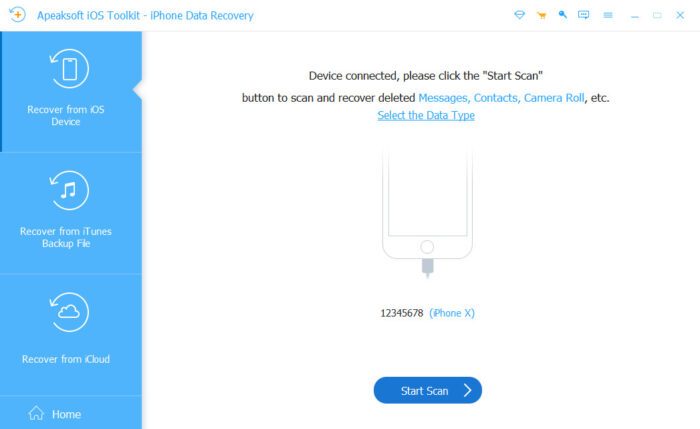
If your iPhone is still functioning, you can connect it to your Windows PC or Mac using a USB cable and perform a deep scan.
This recovery mode searches your device for deleted files that may still be recoverable before they’re overwritten.
Common recovery scenarios include:
- Deleted photos
- Lost contacts
- Missing SMS and iMessages
- Deleted notes
- Call history
- Voice memos
- Safari bookmarks
- Calendar events
- Reminders
No previous backup is required for this recovery method.
- Recover from Finder or iTunes Backup
If you’ve previously backed up your iPhone using Finder (macOS) or iTunes (Windows), Apeaksoft can scan those backup files without restoring them to your device.
Instead of replacing your current data, the software lets you browse the backup contents, preview recoverable files, and restore only the items you want.
This selective recovery approach saves time while preventing unnecessary data loss.
For Windows users, iTunes 10.7 or later (the latest version is recommended) should be installed so the software can properly detect and communicate with your iPhone.
- Recover from iCloud Backup
If your iPhone has been lost, stolen, damaged, or is no longer accessible, you can recover data directly from an existing iCloud backup.
After signing into your Apple account, Apeaksoft downloads the available backup, scans its contents, and allows you to preview and recover individual files.
Unlike Apple’s full restore process, you don’t have to erase your current device just to retrieve a few photos or messages.
Supports More Than 31 File Types
Apeaksoft supports over 31 different data categories, making it useful for recovering both personal memories and business information.
Media Files
- Photos
- Camera Roll
- Videos
- Voice Memos
- Music
Personal Information
- Contacts
- Calendars
- Notes
- Reminders
- Safari Bookmarks
- Safari History
Communication
- SMS
- MMS
- iMessage
- Call History
- Voicemail
Messaging Apps
- WhatsApp Attachments
- LINE
- Viber
- Kik
- Facebook Messenger
This broad compatibility means users can recover far more than just photos, making the software a practical solution for various data loss situations.
Easy-to-Use Interface
A data recovery tool should be simple to use, especially when you’re trying to recover valuable information under stressful circumstances. Apeaksoft iPhone Data Recovery features a clean, well-organized interface that guides users through each step of the recovery process.
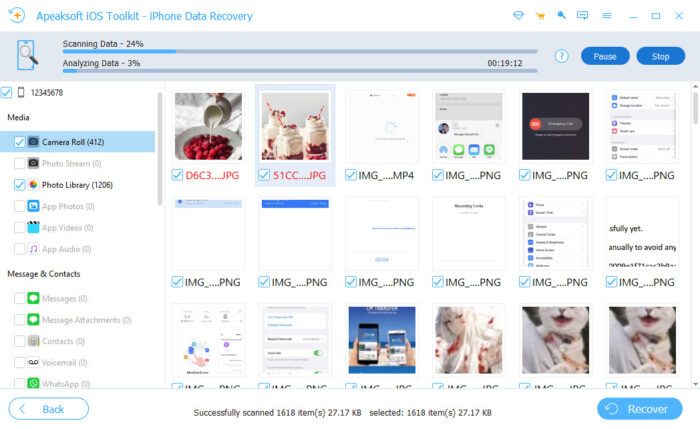
After selecting a recovery mode, the software displays a real-time scanning progress bar so you can monitor the scan as it runs. Once the scan is complete, all recoverable data is organized into easy-to-browse categories.
Deleted files are highlighted in red, making them easier to distinguish from existing data. Built-in search and filtering options also help you quickly locate specific photos, contacts, messages, or documents without manually browsing hundreds of files.
Another useful feature is the preview window, which lets you inspect recoverable items before restoring them. This helps ensure you recover only the files you actually need, saving both time and storage space.
How to Recover Deleted iPhone Data
Recovering deleted files with Apeaksoft is straightforward, even if you’ve never used data recovery software before.
Step 1
Download and install Apeaksoft iPhone Data Recovery on your Windows PC.
Step 2
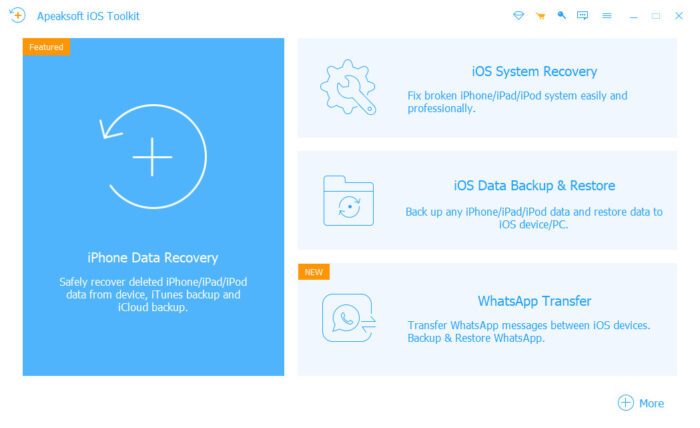
Launch the program and connect your iPhone using a compatible USB cable.
Step 3
Choose one of the three available recovery modes:
- Recover from iOS Device
- Recover from iTunes/Finder Backup
- Recover from iCloud Backup
Step 4
Click Start Scan. The software performs a deep scan of your device or backup while displaying real-time progress.
Step 5
Browse the scan results using categories or the built-in search filters.
Step 6
Preview photos, contacts, messages, notes, WhatsApp conversations, and other recoverable files.
Step 7
Select the items you wish to restore and click Recover to save them to your computer.
The selective recovery process means you don’t have to restore an entire backup just to retrieve a few deleted files.
Common Scenarios Where It Can Help
Accidental Deletion
Deleting photos, contacts, or messages by mistake is one of the most common causes of data loss. If the deleted information hasn’t yet been overwritten, Apeaksoft’s Deep Scan technology can significantly improve the chances of successful recovery.
Failed iOS Update
Occasionally, an iOS update may fail or leave the device stuck during installation. Before restoring your device or reinstalling iOS, Apeaksoft can help retrieve important files.
Factory Reset
A factory reset removes personal data from an iPhone. If you’ve previously created an iCloud or Finder/iTunes backup, Apeaksoft allows you to extract selected files without restoring the entire backup to your device.
System Crash
Software crashes, boot loops, and iOS errors can make an iPhone temporarily inaccessible. The software can often recover important information before more advanced troubleshooting becomes necessary.
Broken or Water-Damaged iPhone
Even if your iPhone is physically damaged, you may still be able to recover important files from an existing iCloud or Finder/iTunes backup, including photos, contacts, messages, notes, and WhatsApp conversations.
Lost or Stolen iPhone
If your iPhone has been lost or stolen, Apeaksoft can download and scan your iCloud backup so you can recover important personal information without needing the original device.
Privacy and Security
When recovering sensitive personal information, privacy matters.
Apeaksoft performs recovery operations locally on your computer instead of uploading your data to third-party cloud servers. This local processing approach gives users greater control over their personal information while reducing potential privacy risks.
Whether you’re recovering business contacts, financial notes, or family photos, your data remains on your own computer throughout the recovery process.
System Compatibility
One of Apeaksoft’s strengths is its broad compatibility across Windows, macOS, iOS, and Apple hardware.
Windows
The Windows version supports:
- Windows XP (Service Pack 2)
- Windows Vista
- Windows 7
- Windows 8
- Windows 8.1
- Windows 10
- Windows 11
For Windows users, iTunes 10.7 or later (latest version recommended) should be installed to ensure proper communication between the software and iOS devices.
macOS
Compatible with:
- macOS OS X 10.7 and later
- Recent macOS releases
Supported Apple Devices
Apeaksoft supports a wide range of Apple hardware, including:
- iPhone 4 and later (including the latest iPhone models)
- iPad
- iPad mini
- iPad Air
- iPad Pro
- iPod touch (1st through 7th generation)
Supported iOS Versions
The software supports:
- iOS 5 and later
- Recent iOS releases
- Current iPadOS versions
- Beta versions of supported iOS and iPadOS releases where applicable
This extensive compatibility makes Apeaksoft suitable for both older Apple devices and the latest iPhone and iPad models.
Download Apeaksoft iPhone Data Recovery
The software is available for both Windows and macOS.
Before purchasing, you can download the free trial to scan your device or existing backups and preview recoverable files. This allows you to verify that your lost data can be found before buying a license.
If you’re specifically trying to recover deleted pictures, you may also find Apeaksoft’s guide on how to recover deleted photos from iPhone helpful, as it explains additional recovery methods and best practices before data is permanently overwritten.
Pricing
Apeaksoft offers a free trial that allows users to:
- Install the software
- Scan an iPhone, iPad, or backup
- Preview recoverable files
- Verify whether deleted data can be recovered before purchasing
At the time of writing, Apeaksoft is also offering promotional discounts on selected Windows licenses. Since pricing and promotions may change, it’s always a good idea to check the official Apeaksoft website for the latest plans and offers before making a purchase.
Apeaksoft iPhone Data Recovery
Overall
-
Three flexible recovery modes
(4.5)
-
Supports 31+ data types
(4.5)
-
Performance and UI
(4.5)
-
Deep Scan for improved recovery success
(5)
-
Local processing for better privacy
(5)
Summary
Recover deleted photos, messages, WhatsApp chats, contacts, notes, and more with Apeaksoft iPhone Data Recovery for Windows. Own your data even its lost.
Pros
- Preview files before recovery
- Selective recovery without restoring an entire backup
- Local processing for better privacy
Cons
- Scan time varies based on device storage

Leave a Reply