
Businesses depend on trusted software for email communications, file sharing, team collaboration, and productivity. That’s why Microsoft 365 has become an indispensable solution for small and large organizations. It is a comprehensive suite that includes various tools, such as Exchange Online for email, SharePoint Online for team collaboration, and OneDrive for Business for file storage. The dependence on these cloud-based platforms also highlights a crucial vulnerability and threat of user data loss. That’s why advanced Microsoft Office 365 data protection is essential.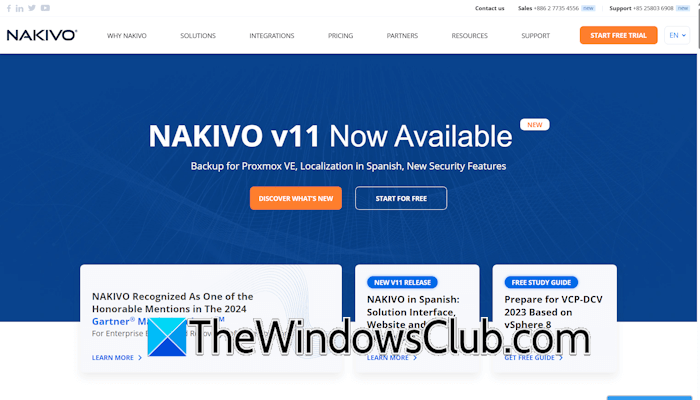
While Microsoft has a robust security infrastructure, protecting user data is the organization’s core responsibility according to Microsoft’s Shared Responsibility Model. This article talks about the need for a dedicated solution, such as NAKIVO Backup & Replication, for advanced Microsoft Office 365 data protection.
Why Do You Need Microsoft Office 365 Data Protection?
Data loss can occur due to several reasons, including human error, malware infection, ransomware infection, and data corruption. Whether it is an accident, a result of a cyberattack, or a system failure, data loss can have serious consequences.
- Operational disruption: Employees can lose access to essential files, emails, collaboration tools, etc., which slows down daily operations.
- Financial loss: Operational disruption due to data loss results in downtime during which an organization experiences financial loss.
- Legal risks: Data loss can lead to compliance issues, which in turn can cause legal repercussions..
NAKIVO for Microsoft 365 data protection ensures business continuity by enabling fast and efficient data backup and recovery. The solution offers comprehensive Microsoft 365 data loss protection, enabling organizations to recover data from both accidental deletions and targeted attacks. You can get started with a fully featured 15-day free trial to explore all features risk-free.
Does Microsoft Back Up Office 365 Data?
There is a misconception among most users that Microsoft backs up Office 365 data. Microsoft follows the Shared Responsibility Model, which means it ensures the security and uptime of its infrastructure, but customers are responsible for protecting their data for all cloud deployment types. Customers are responsible for protecting their data and identities, as well as on-premises resources and the cloud components they control.
Should you back up Microsoft 365? The answer is yes. Microsoft retains deleted items only for a limited period. After that, the data becomes irretrievable. This limitation makes businesses vulnerable to data loss. NAKIVO offers a powerful solution and eliminates this limitation.
Microsoft Office 365 Ransomware Protection
Platforms like Microsoft Office 365 are the prime target of cybercriminals. A single compromised account can result in huge data loss for an organization.
With an effective Microsoft Office 365 Ransomware protection plan, organizations can significantly reduce the risk of data breaches and downtime. The NAKIVO software provides regular backups, ensuring businesses can recover from a ransomware attack in Microsoft 365 without incurring any costs.
When a Ransomware attack occurs, NAKIVO’s Microsoft 365 ransomware recovery feature allows organizations to restore backups within minutes and resume operations.
NAKIVO review: Reliable Microsoft 365 Data Backup Solution
NAKIVO is a reliable Microsoft 365 data backup solution for SMBs and enterprises. It provides a streamlined and high-performance M365 data protection solution that covers:
- Exchange Online
- OneDrive for Business
- SharePoint Online
- Microsoft Teams
NAKIVO also supports active backup for Microsoft 365, ensuring your data is protected automatically. An active data backup service is a real-time data backup solution that continuously protects your files and databases. Unlike traditional backups that run at a scheduled time, active data backup service ensures minimal data loss by capturing changes instantly.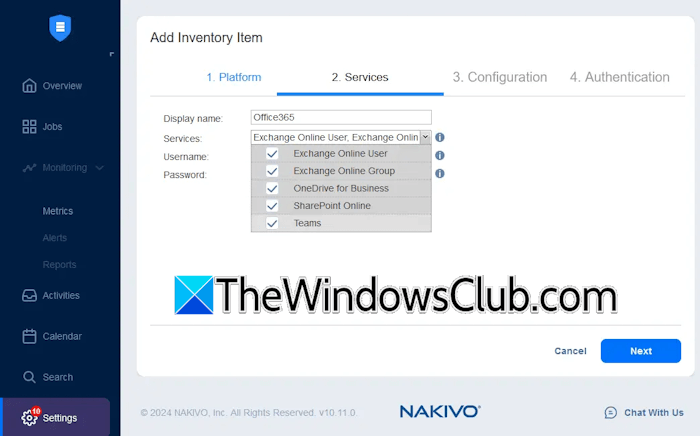
The following are some key features of Active Backup for Microsoft 365:
- Automatically creates backups when files are created or deleted.
- Reduces the risk of data loss.
- Maintains immutable M365 backup copies to restore clean data in case of a ransomware infection.
With immutable M365 data protection, NAKIVO’s backups are stored in immutable repositories, making it impossible to modify or delete the backed-up data without an admin’s permission. This ensures that a safe copy of data is always available and can be restored, even during a ransomware attack.
Exchange Online backup with NAKIVO
Emails are the backbone of business communication, as they contain critical information, like financial records, client contracts, and other important documents. Losing access to this data, whether due to accidental deletion, a ransomware attack, or system failure, results in operational disruption.
The NAKIVO Exchange Online backup solution ensures secure copies of data that can be easily restored in case of user error, system failure, or a cyberattack.
Back up Microsoft Teams data quickly with NAKIVO
Microsoft Teams is a central hub for remote and hybrid work environments. It includes files shared in chats, meeting recordings, notes, and more. Moreover, Microsoft Teams also integrates with other Microsoft 365 applications, like SharePoint Online, OneDrive for Business, and Exchange Online. That’s why it is also important to back up Microsoft Teams data.
NAKIVO’s comprehensive Microsoft Teams backup solution ensures the complete recovery of data even if it is deleted or corrupted.
Choosing NAKIVO for M365 Data Protection
NAKIVO includes several capabilities to ensure Microsoft 365 data loss protection:
- Ease of use: NAKIVO has a user-friendly dashboard and offers fast deployment, which makes it easy to use for Microsoft 365 data backup.
- Support for multiple Microsoft 365 services: NAKIVO supports multiple Microsoft 365 services, including Exchange Online, OneDrive for Business, SharePoint Online, and Microsoft Teams.
- Multiple storage destinations: With the NAKIVO backup software, you can store Office 365 backups on your local hard drive or send backup copies directly to cloud platforms or S3-compatible storage.
- Flexible recovery options: NAKIVO allows you to recover specific Microsoft Office 365 items to the original and custom locations.
- Powerful security and ransomware resilience: You can configure backup encryption at source, in transit, and at rest. NAKIVO also allows you to store immutable and air-gapped backups to prevent modification or deletion by ransomware.
- Advanced compliance search: You can easily locate and retrieve the data you need (messages, calendar events, contact items, list content, and more) in Microsoft 365 backups using the search box or navigation panel.
Pricing Plans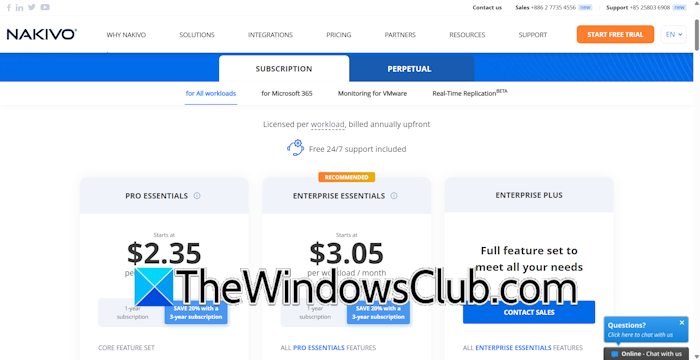
NAKIVO offers various pricing plans tailored to your needs. You can purchase a subscription for all workloads or Microsoft 365. Its Microsoft 365 edition supports backups for Exchange Online, OneDrive for Business, SharePoint Online, and Microsoft Teams. To get more details about their pricing plans, visit the official website.
Conclusion
Microsoft 365’s native backup and recovery options are limited, so relying solely on them is insufficient to ensure optimal data protection. From accidental deletion to ransomware attacks, your organization’s data remains at risk. NAKIVO’s comprehensive Microsoft 365 data backup and recovery solution eliminates the risk of data loss with automated, ransomware-proof backups and instant recovery. NAKIVO also provides a centralized hub for managing backups of all Microsoft 365 services, including Microsoft Exchange Online, OneDrive for Business, and SharePoint Online.

Leave a Reply