
For many of us, note-taking is an integral part of our lives. We take notes to be more productive, save crucial information, and more. However, note-taking hasn’t been revolutionized significantly until now. This is where products like HyNote.ai come into the picture.
It is a powerful AI-powered note-taking and transcription tool that changes how we capture, organize, and interact with our notes. However, if you haven’t heard of the tool before, then this post will tell you all about it.
What is HyNote.ai?
HyNote.ai markets itself as an all-in-one AI note-taking solution. It doesn’t just transcribe; it also gives you full control over content management and helps with intelligent summarization.
The app is targeted towards students, professionals, businesses, and anyone else who needs help taking or organizing their notes.
The best part of HyNote is that it has the ability to process multiple input types. For instance, you can include audio recordings, images, PDFs, YouTube videos, and more. Plus, you will get AI-powered insights on your stored information.
Use AI Note taker for Audio Transcription, Meeting Notes, PDF Summary
HyNote.ai uses AI to automatically transcribe speech, identify speakers, generate summaries, and even create study materials like flashcards and quizzes.
Core Features and Capabilities
AI transcription (meetings, lectures)
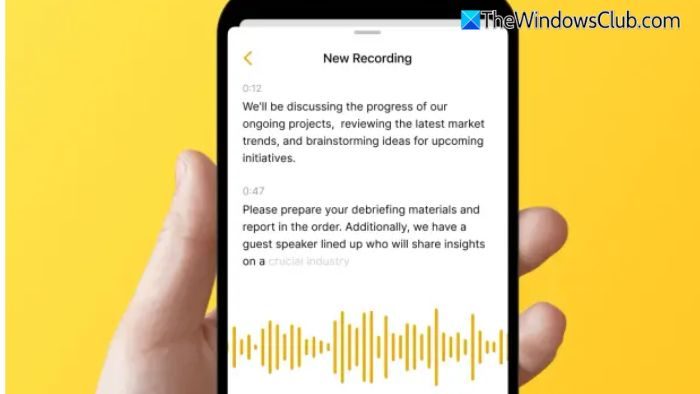
HyNote is capable of transcribing your meetings and lectures with an accuracy rate of up to 99%. The app can perform real-time transcription during live meetings and lectures and automatically converts them into accurate text with proper formatting and punctuation. Additionally, it features speaker diarization, which automatically detects different speakers in conversations.
It also supports over 100 languages. So even if English isn’t your first language, the app should be able to transcribe your meetings and lectures in real-time.
YouTube transcript generator
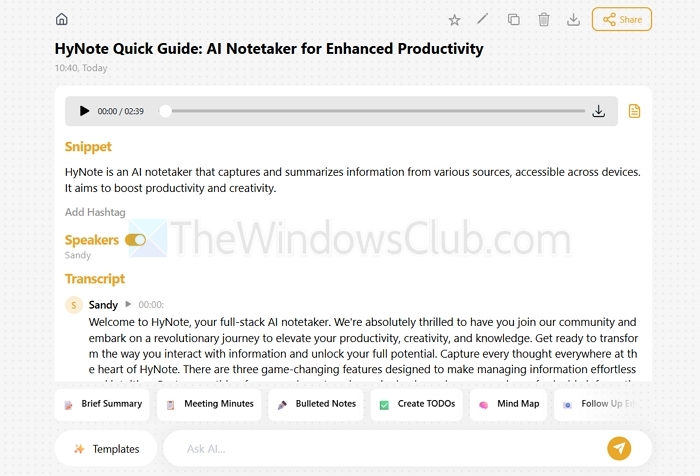
HyNote also offers you YouTube video processing. By inputting a video URL, you will be able to generate comprehensive transcripts. This could be extremely useful if you don’t want to watch long YouTube videos and prefer to go through text material. Furthermore, you can also use HyNote’s AI summarization capabilities to summarize the content for quicker learning.
PDF & website summarizer

The app can also summarize PDFs and websites. You can upload documents into the app, and it will share AI-generated summaries. So you can quickly get an idea of the PDF’s content without needing to go through the whole file. Also, its summarizing algorithm is pretty powerful when it comes to identifying and extracting valuable information. The same capabilities are also applicable for web-based content. Just enter the URL, and you are good to go.
OCR (text from images)
HyNote also features an OCR (Optical Character Recognition) function that enables you to extract text from images of whiteboards, handwritten notes, or printed documents. So you can avoid taking handwritten notes. Plus, you can digitize different types of information pretty easily. Once the content is extracted, you can utilize additional features such as AI summarization, export, and more.
Templates & export options (PDF, Word, Notion, Docs)
It also comes with various templates meant for different use cases, such as meeting minutes, lecture notes, research summaries, and more. All these templates automatically structure AI-generated content into appropriate formats that ensure consistency. Furthermore, you can also export your content into multiple formats like PDF, Microsoft Word, or directly integrate with other tools like Notion and Google Docs.
Cross-platform support (web, mobile, Chrome extension)
HyNote operates seamlessly across web browsers, mobile applications, and as a Chrome extension. Regardless of the device you are using, you will be able to easily take notes and access them. Also, as it is a web-based app, it doesn’t matter if you are using Windows, Mac, Chromebook. It will work across all devices.
Security & privacy (data encryption)
HyNote implements comprehensive security features that protect users’ data through the entire content lifecycle. It also uses end-to-end encryption for all uploaded content, ensuring that audio files, transcripts, documents, and personal notes remain secure during transmission and storage.
HyNote.ai use cases
- Students: By using HyNote, students will be able to transcribe lectures in real-time without missing any important details and eliminate the need for manual note-taking.
- Professionals: Business professionals can use HyNote for comprehensive meeting documentation. It captures audio from video conferences or in-person meetings while generating accurate transcripts with speaker identification for better follow-up accountability.
- Researchers & content creators: Researchers can utilize HyNote’s comprehensive processing capabilities to handle large volumes of academic papers, interview recordings, and video content, automatically generating transcripts and identifying themes across multiple sources for systematic analysis.
HyNote.ai Pricing
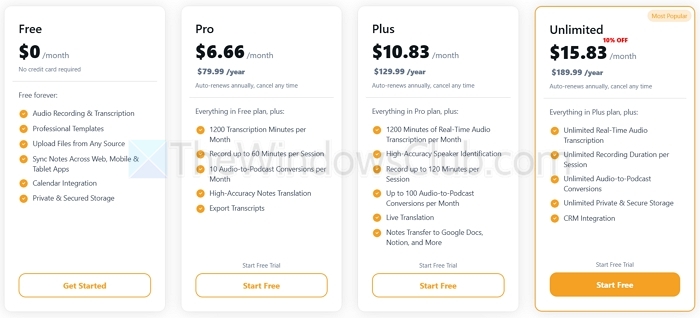
Now, coming to pricing plans for HyNote, the app has multiple free and paid plans. The free plan offers a range of features, including audio recording and transcription, professional templates, file syncing, and calendar integration.
Apart from the free plan, there are also the Pro and Plus Plans priced at $6.66/month and $10.83/month, respectively. These plans include everything in the free plan along with 1,200 transcription minutes per month, high-accuracy notes translation, live translation, and more.
There is also an Unlimited plan priced at $15.83/month. It offers unlimited real-time audio transcription, unlimited recording duration per session, and more.
Additionally, there is the Teams plan, which costs $10 per seat. It includes all the advanced features with unlimited access, plus team templates, admin controls, priority support, and more.
Evaluation Points
- Accuracy of transcription/summaries: HyNote.ai performs very well when it comes to transcription. It offers accurate transcripts and helpful summaries capturing the key points and action items. In terms of evaluation points, it would score 9 out of 10.
- Ease of use & interface: In terms of how easy it is to use the app, it gets a 10/10 score. The interface is clean, intuitive, and beginner-friendly.
- Speed & reliability: It also scores a 10/10 when it comes to speed and reliability. It is fast, with transcripts and summaries delivered in minutes. Additionally, your files are stored and synced across devices, allowing you to export them with ease.
Pros & cons (Strengths vs. Limitations)
Pros:
- Clean and intuitive design
- Strong summarization with action items, especially in meetings or study contexts
- Multiple input types
- 99% accurate transcription for audio
Cons:
- Accuracy degrades with noisy, accented, or overlapping speech
- Weak organizational tools for power users

Leave a Reply