
One effective way to stay super productive and organized is to use a scheduling tool, especially if you frequently attend multiple meetings throughout the day. As the world transitions to a hybrid work culture, scheduling and time management tools are more essential than ever. And this is where a tool like Clockwise comes into play.
It is not just any other scheduling tool but an intelligent, AI-powered tool that manages your calendar to create uninterrupted blocks of focus time, reschedule meetings, and more. However, if you haven’t heard of the tool before, then here’s our Clockwise review.
What is Clockwise?
Clockwise is a smart calendar management tool designed to optimize how teams schedule and protect their time. Its primary goal is to reduce distractions and boost productivity by automating scheduling and preserving blocks of uninterrupted Focus Time.
It is an AI-powered calendar assistant tool that helps you automatically optimize your work schedules. The primary purpose of the tool is to help you with more focus time and reduce meeting overload. It rearranges your meetings when possible, protects your breaks, and aligns with team calendars so you get more time to do deep work and it’s not always a meeting after another.
Clockwise AI Calendar review
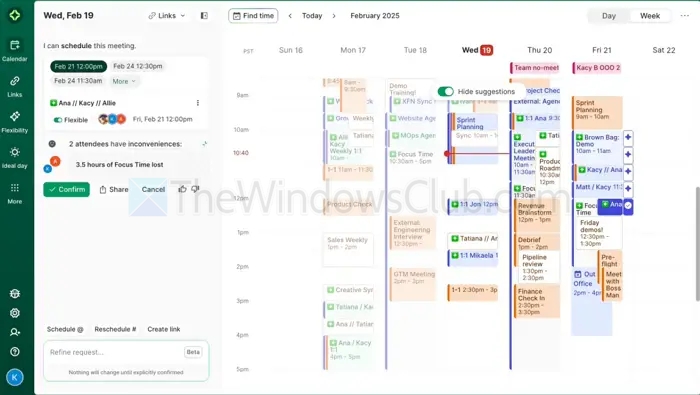
1] AI-powered calendar optimization
Clockwise is integrated with a smart AI engine that automatically rearranges your meetings and tasks. This helps in reducing context switching and gives you more time for uninterrupted high-quality work. So you don’t have to schedule your meetings or tasks by yourself.
2] Focus on Time creation
One of the coolest features of Clockwise is that it comes with Focus Time, which protects blocks of deep work in your day. It automatically detects a window of opportunity for deep work and protects it from any interruptions. So you can actually focus on your work and get things done.
3] Smart meeting scheduling
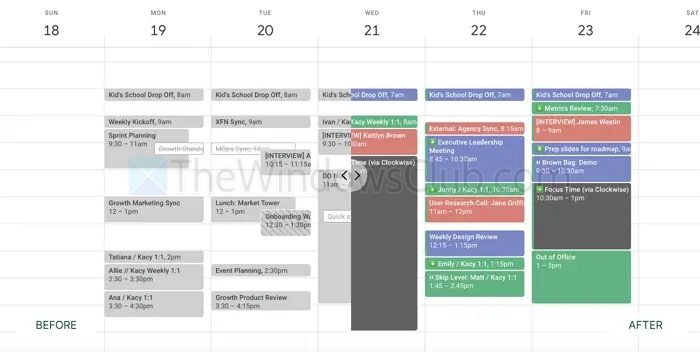
In a team environment, Clockwise will scan for everyone’s availability and meeting preferences before suggesting a time slot. This helps in reducing scheduling conflicts, making meetings more efficient, and reducing pressure to work overtime.
4] Team coordination
As it has all the info, Clockwise will ensure that all the meetings are planned in a way that works best for everyone. It also creates harmony across teams by preventing overlapping schedules and protecting individual focus time.
5] Seamless integration with Google Calendar and Slack
Clockwise also gets integrated with popular calendar and productivity tools like Google Calendar and Slack. So if you are using these two already, you enjoy automated syncing across apps in real time. Also, it updates your status on Slack automatically—like changing your status to Focus Time or In a Meeting—so your coworkers will know when to connect with you.
6] Personal scheduling assistant
Clockwise also works as your virtual assistant that quietly manages your meetings for you. It handles your meetings effortlessly, manages time blocks, and gives you the time to focus on things that matter the most.
7] Analytics and insights
With Clockwise, you will also get analytics and insights that will tell you how well you spent your time. This will help you improve your work habits, manage your time better, or give you stats that you can take into account to improve your productivity.
How you can use Clockwise
Individual productivity: Clockwise can help you protect time for deep work automatically by clearing up space on your calendar.
- Team efficiency: Teams can use Clockwise to smartly organize their meetings without compromising anyone’s focus time.
- Remote and hybrid work: Clockwise can smartly manage meetings across time zones and work styles, making remote collaboration more efficient.
- Project management: Project managers use Clockwise to ensure their teams have the right balance of meetings and execution time, keeping projects on track without burning people out.
- Executive assistants: EAs can streamline complex calendar management with Clockwise, making it easier to schedule meetings, avoid conflicts, and protect time for high-priority work.
Pros and Cons
Pros:
- AI-driven optimization saves time and reduces manual scheduling
- Protects and creates focus time for deep work
- Seamless integration with Google Calendar and Slack
- Team-level coordination for better collaboration
- Useful analytics and insights for continuous improvement
Cons:
- Advanced features may require a paid plan
- Limited to Google Calendar (as of now)
- May require some initial adjustment to trust AI with calendar control
Pricing
The Free plan costs USD 0 per user per month and is designed for individuals or small teams needing basic intelligent calendar management. Features include smart scheduling, personal time protection, and unlimited scheduling links.
The Teams plan, marked as “Recommended,” is priced at USD 6.75 per user per month when billed annually ($7.75 monthly billed). This tier adds features to optimize meeting times, protect focus time with auto-scheduled holds, and schedule group meetings with more control and flexibility.
The Business plan costs USD 11.50 per user per month, also billed annually, with no option for monthly billing. It includes all features from the Teams plan and adds advanced organization-wide tools like meeting load tracking, billing, and admin controls, and balanced meeting distribution using round-robin scheduling.
The Enterprise plan offers custom pricing (“Let’s talk!”) and is tailored for organizations with more advanced security and customization needs. It includes all Business features plus centralized user provisioning, custom data processing, and prioritized support.
Overall, Clockwise’s pricing structure caters to a range of user needs, from individuals to large enterprises, with increasing features and scalability at higher tiers.
With Clockwise, you can create the perfect schedule based on your preferences. It helps you free up time for deep work and schedule meetings with teammates at the best time for everyone. Also, getting started with the tool is straightforward—just sign up, connect your work calendar, and it will take care of the rest.

Leave a Reply