
If you are a designer or developer, you already know how frustrating it is to convert a screenshot into a Figma design or a Figma design into code. However, thanks to AI, you can use various tools to automate the process, so you no longer need to waste time.
However, among the sea of AI tools made specifically for this job, Codia AI stands out. It changes the game for designers and developers by either converting a screenshot into a Figma template or providing clean code for frameworks like React or SwiftUI.
But is it the best? Let us find out in this Codia AI review.
What is Codia AI?
Codia AI is a powerful AI tool that converts your design work into functional code, or, pretty much, gives you something closer to what you are designing.
It uses advanced computer vision and machine learning algorithms to understand UI layouts from images, screenshots, live websites, or design files. Then it rebuilds them as editable designs for Figma or production-ready code.
Plus, it supports a wide range of frameworks, including HTML/CSS, React, Vue for the web, SwiftUI, Kotlin/Compose, and more. Plus, you can get direct code export from GitHub and enjoy one-click deployment.
Key Features of Codia AI
Screenshot to editable Figma design
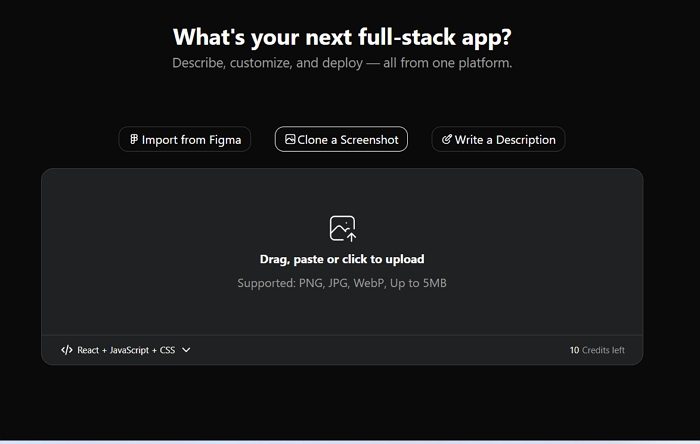
One of the key features of Codia AI is that you can just upload a screenshot and get a Figma template right away. So if you have liked a website design or app design, you can simply take a screenshot and rework on it. It will save you hours of time. Plus, you can easily change text, replace images, adjust layouts or rework any components without starting from scratch.
Web to Figma via browser extension
It also offers you a browser extension, so any website you visit becomes an editable design file. You do not need to recreate the UI components from level zero. Instead, you can capture real product pages in a single click and import those elements directly into your Figma file. This simplifies the process of audits, UI references, competitive teardowns, and transforming existing products into new design systems.
Figma to production-ready code
Once a design is approved, Codia AI can convert Figma frames into clean, exportable frontend code. It supports popular frameworks like React for the web and SwiftUI for iOS, with more options expanding across mobile and cross-platform development. Styling, component structure, and layout rules are generated automatically so engineers can skip repetitive markup and focus on logic and polish.
Image or text prompt to code
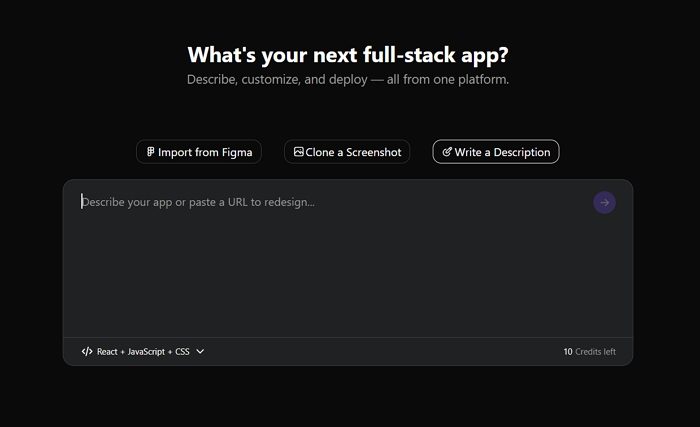
If you do not have a design in mind, Codia AI can still help you get started. All you have to do is describe your UI in plain language, and it will generate a rough design for you to work on. Alternatively, you can also upload a rough mockup or image reference, and Codia AI will do the rest. It can create pixel-accurate interfaces ready for further editing or prototyping.
Workflow accelerators and smart detection
Codia AI can also analyze layout hierarchy, components, spacing, and typography to preserve structure and reduce cleanup work. It can efficiently recognize common UI patterns like buttons, forms, cards, and navigation elements and turn them into reusable components. Plus, this helps in bringing consistency across screens and keeps handoffs clean between design and engineering teams.
Coding AI core use cases
- Competitive teardown and prototyping: You can convert your competitor’s website or app designs into editable Figma files without much manual work. Also, you can easily analyze UI patterns, quickly test improvements, or build updated prototypes.
- Design to engineering handoff: You can export clean, production-ready code directly from designs. This helps reduce back-and-forth interactions between designers and developers. Plus, you can save on frontend development time and ship products faster.
- Multi-platform UI acceleration: It allows you to generate code for both web and mobile platforms from a single design source, so you get design consistency across devices.
- Rapid experimentation: It gives you the ability for rapid experimentation. You can turn any image reference into a workable solution, so you can explore concepts, validate ideas, and prototype faster.
- Refactoring legacy UI into modern components
Convert outdated UI screenshots or app screens into clean, modern Figma layouts for easy redesign. - Creating UI documentation faster
Transform live websites or mockups into structured component libraries-speeding up style guides and design documentation.
Codia AI pricing
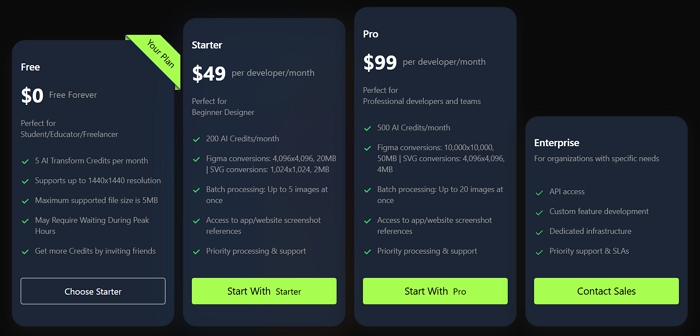
Coming to the pricing, Codia AI offers you a free plan targeted towards students, educators, or freelancers. The free plan offers 5 AI transform credits per month, supports up to 1440×1440 resolution, and has a maximum file size of 5 MB.
However, if you are a professional, you can go for the Starter or Pro plan. These plans are priced at $49/month and $99/month, respectively.
The Starter plan offers you up to 200 AI credits/month, while the Pro plan offers you 500 AI credits/month.
Apart from these two plans, you also have the Enterprise plan made for organizations with specific needs. It offers additional features such as API access, custom feature development, dedicated infrastructure, and more.
So that was a quick rundown of Codia AI. It is one of the powerful tools capable of converting images or text into production-ready code with 99% pixel accuracy. So go ahead and check out its free plan and see if it does the job for you.

Leave a Reply