
Finding a good note-taking app is often a struggle. You have options like Notion or Obsidian. But many users find these tools too complicated to use. Hence, if you are looking for something simpler and easy to use, Craft is something you must check out.
Craft is your one-stop solution for docs, tasks, calendar, whiteboards, and daily notes. However, if you have not heard of the tool before, this guide will help you discover all about it.
What is Craft productivity app?
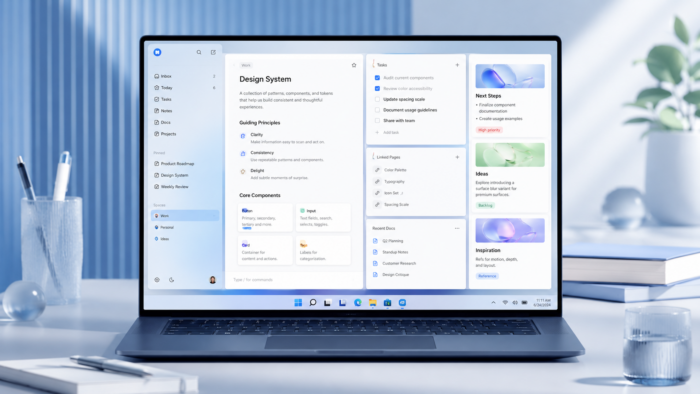
Craft is a well-known productivity app that combines different features into one. You can use it for note-taking, task management, documents, and AI assistance. It also has a beautiful user interface, and it is built around the idea that your notes, documents, and tasks stay under one roof.
The app is natively available for Windows, macOS, iOS, and Android. Plus, you can use it directly via a web browser. It also has features like real-time sync across devices, and the app works offline too.
Key features of Craft productivity app
Structured documents and rich content blocks
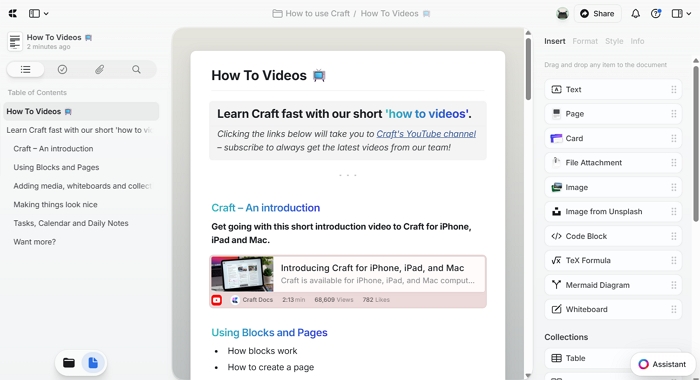
Craft is a block-based tool. As a result, every paragraph, heading, image, table, checklist, or embedded file is a block that you can move around, style, or link to. This helps structure your documents without complicated pages. It allows you to nest pages inside pages, create sub-documents, and build a personal wiki to keep everything organized. Plus, you can add custom cover images, custom fonts, and color schemes to customize your setup.
Built-in task management
Tasks in Craft live within your documents rather than as a separate feature. You can turn any line into a to-do item, create checklists inside meeting notes, and plan projects alongside your writing. So, you can easily view and manage the tasks related to a document rather than needing to open up a separate window to see your tasks.
Collections for knowledge organization
With collections, you can transform groups of documents into a structured, filterable system. You can tag documents, assign custom properties, and filter these tags to build a knowledge base, reading list, project trackers, and reference libraries.
Free on-device AI with privacy and offline support
Craft also integrates with Apple’s on-device Foundation Models at no cost on any plan. Because everything runs directly on your device, your content stays private, works fully offline, and does not consume any AI credits. Plus, the 2026 updates have significantly improved this by adding support for longer conversations, making AI interactions feel more natural and useful for extended work sessions. Furthermore, you can also use your own OpenAI or Anthropic API credentials to use the AI assistant without needing to use Craft’s quota.
Offline-first architecture with real-time sync
All your documents are stored locally and sync when connected. The app works fully offline and never lags or fails due to a weak signal. Your documents are always available, and changes sync across devices when you’re online.
Native cross-platform apps
Craft runs on multiple platforms, including Windows, macOS, iOS, iPadOS and Android, and also works fully in a browser at docs.craft.do. Also, the Windows version is currently in development, and it will offer the same experience as the Mac version, not a downgraded web wrapper.
Document storage and export options
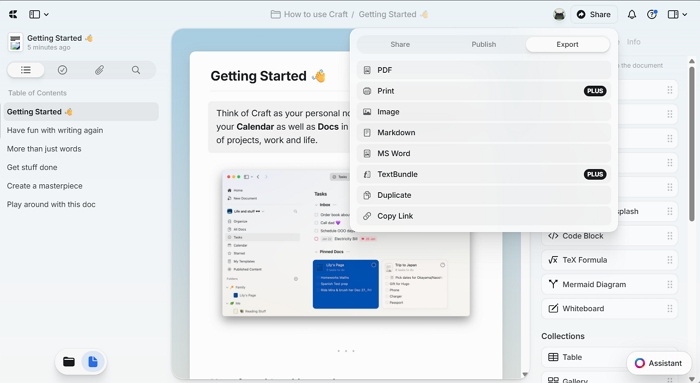
You can export your documents as PDF, Markdown, Word, or plain text. Also, you can share your documents via a public link that recipients can open in a browser without a Craft account, making it easy to send polished meeting notes, client briefs, or reference documents to anyone. Plus, you can integrate Craft with Bear, Day One, Drafts, Ulysses, and other writing apps for content transfer.
Use Cases
- Note-taking and writing: Quickly note down an idea, draft content, or write long-form content in a clean, distraction-free environment.
- Knowledge management: You can organize everything under one roof, plus link documents or manage them via collections. So, you can filter your documents and find them easily.
- Task and project planning: Simply turn any note into an action item and plan projects directly alongside your document without using a separate tool.
- Document organization: You can store all your documents structured in folders, sub-pages, and collections so nothing gets buried, and everything is one search away.
- Meeting notes and handouts: You can easily write meeting notes in Craft and share them instantly as a polished, browser-viewable document. Plus, there is no formatting work required.
- Personal productivity: You can use daily notes and built-in tasks to plan your day, track your goals, and keep your personal workflow in one place.
- Team collaboration: You can edit documents together in real time, share a workspace, and publish content your whole team can access from any device or browser.
- Academic and research work: Collect sources, organize lecture notes, and write papers in a workspace that keeps your references and ideas connected.
Craft app Pricing
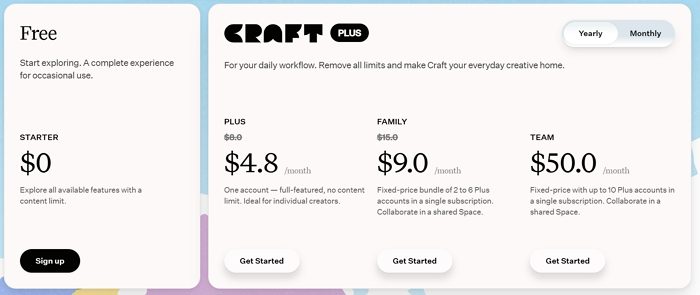
Regarding pricing, Craft offers both free and paid plans. The free plan is good enough for occasional use and offers all available features with content limitations.
When it comes to premium plans, Craft offers Plus, Family, and Team plans, priced at $4.8/month, $9.0/month, and $50.0/month, respectively, when billed annually. You can learn more about the pricing and feature limitations across plans on Craft’s website. Download to get started.
Overall, Craft is one of the best-designed productivity apps available out there. It offers all the features one seeks in a note-taking app, such as cross-platform content sharing, a free plan, AI assistance, and more. So go ahead and give the tool a try and see how it works out for you.

Leave a Reply