
One of the key areas of software development is software testing. A software tester needs to write scripts for QA workflows, tweak their code as the results come in, and so on. The whole process is time-consuming. But as a developer, you can completely automate this process with the help of Momentic AI.
Momentic AI is an automated testing platform that makes end-to-end testing 10x faster through natural language test authoring and intelligent automation. As a result, you only need to describe what you want in plain English and let AI handle the execution.
However, if you haven’t heard of the tool before, here’s a complete walkthrough of it:
Momentic AI review
Natural language test authoring
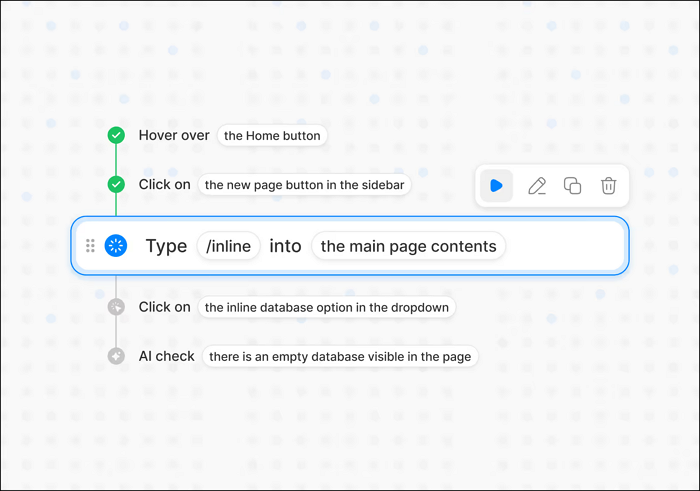
One of the key features of the AI tool is that it allows you to write tests the way you think. All you have to do is describe different test scenarios in plain English instead of writing CSS selectors or XPath. This helps in removing scripting complexity and allows both QA and non-technical team members to contribute to the app development process.
AI element detection
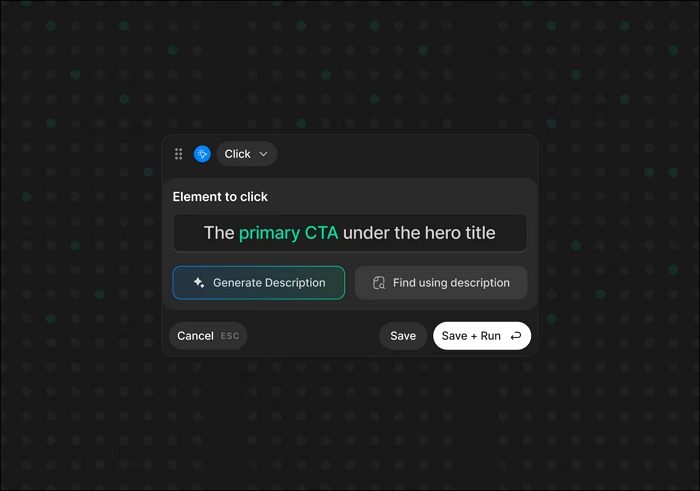
Traditional tools depend on fragile selectors that break with minor UI changes. However, with Momentic AI, you can automatically find and interact with different UI elements by understanding the interface and avoid depending on static selectors.
Low-code visual editor
It also comes with a built-in visual test builder. This helps in speeding up end-to-end test creation by 10x. In the builder window, you can design, edit, and validate tests visually and let the AI handle the underlying logic.
Auto-generated tests
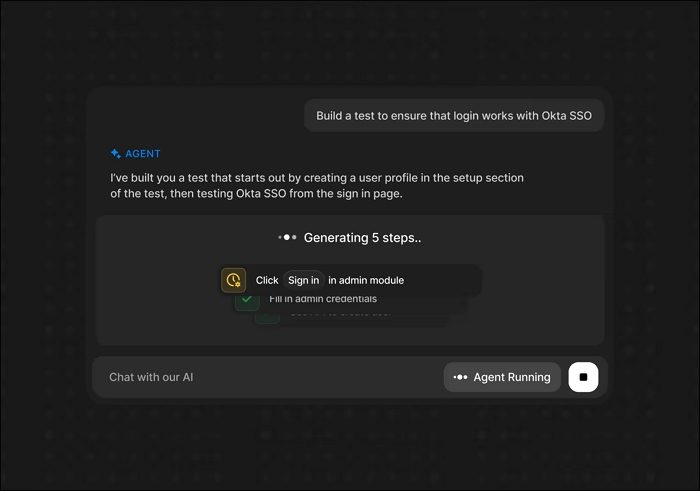
If you don’t want to write tests by yourself, you can let Momentic AI do it for you. Its AI starts by exploring your application, identifies critical user flows, and generates complete test cases automatically. Instead of manually scripting every scenario, let the AI do the job for you.
Self-healing tests
In case there is a UI change, your tests won’t break, as Momentic AI adapts to layout and element changes automatically. As a result, your tests continue without manual fixes.
Multi-modal AI assertions
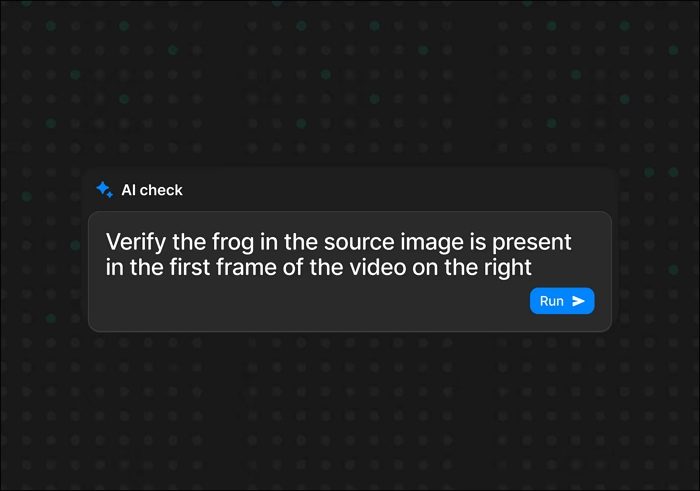
With this AI tool, assertions are not limited to simple checks. Momentic AI reasons about expected behavior, validates workflows, and performs AI-powered visual comparisons to catch subtle issues humans care about.
AI actions
You also don’t have to write custom scripting or logic chains. Instead, the AI handles login sequences, form submissions, multi-step workflows, and conditional paths.
Cloud and CLI execution
You can also run tests instantly in Momentic Cloud for fast setup and collaboration, or use the CLI to integrate directly into your repository and CI/CD pipelines.
Web and mobile support
Momentic AI offers web and mobile support. You can easily test web and mobile applications using an AI-first approach and get consistent coverage across platforms.
Visual regression testing
Momentic AI can also detect unintended UI changes across releases. It understands layout, components, and visual intent. As a result, whenever there is a UI change, developers can catch design regressions and broken UI states early.
Enterprise use cases
- Continuous integration testing: Momentic AI easily fits into your CI/CD pipelines without adding test maintenance overhead. You can use its AI-driven, self-healing tests to stay stable even as the UI evolves, so pipelines stay fast and reliable.
- Regression testing: As your app changes, the AI automatically catches breaking behavior across existing flows. So you don’t have to rewrite test scripts after every update.
- User flow validation: Critical paths like signup, checkout, onboarding, and payments are validated end-to-end. The AI reasons about these flows the same way a human would. So you can be sure that the user journey remains as it should be.
- Cross-browser testing: You can easily validate behavior across browsers and devices without maintaining separate test logic, as the AI adapts interactions and assertions across environments.
- Accessibility testing: Momentic AI helps measure ease of use and accessibility compliance by validating interactions, visibility, and usability issues that affect real users.
- Form and login testing: If you have complex forms, authentication flows, multi-step submissions, and edge cases, those are handled smartly by the AI. So there is no need to write custom scripts for every variation.
- Visual QA: The AI tool also checks how your app looks after every change and flags UI issues. So instead of tests failing due to irrelevant pixel shifts, it focuses on real visual problems like broken layouts, missing elements, or incorrect designs.
- Pre-release validation: Before deployment of your app, you can run comprehensive test suites covering functionality, user flows, and visuals. So you can ship the app with confidence.
AI as a QA engineer
Momentic AI works like a human QA engineer, not like a traditional testing tool. It starts by exploring and understanding the UI and interacting with it the way a real user would, instead of following pre-written scripts.
You tell the AI which tests to run, such as user sign-ups, logins, and complete checkout. Then the AI identifies critical user flows, generates the required test cases, and executes them.
So you don’t have to spend time writing and maintaining test scripts, selectors, and assertions. You give the AI a QA checklist in natural language, and it handles the execution for you.
Cloud vs. CLI comparison
| Criteria | Momentic Cloud | Momentic CLI |
| Setup Time | Minutes, no local setup required | Requires setup inside the code repository |
| Integration | Browser-based, standalone | Integrates with CI/CD pipelines |
| Tooling Needed | No local development tools | Requires developer environment |
| Best Use Cases | Product exploration, quick testing, demos | Continuous testing, release automation |
| Team Fit | QA teams, product managers, non-technical users | Developers, DevOps, engineering teams |
| Execution | Manual or scheduled runs from cloud | Automated runs on every build or deploy |
Recommendation: Start with Momentic Cloud to explore and validate quickly. Move to the CLI when you need automated testing as part of your production CI/CD pipeline.
Real-world impact
Momentic AI also has a real-world impact. A public company used the AI and reported a 16x speed increase compared to Playwright, dramatically reducing the time required to build and run end-to-end tests.
Also, thanks to its low-code editor, you can create tests 10x faster. Plus, there are self-healing tests that automatically adapt to UI changes and eliminate the constant cycle of fixing broken selectors and scripts.
Additionally, it helps reduce the overall QA effort, as fewer engineers have to spend time maintaining tests and can focus more on improving the app.
The maintenance problem explained
Traditional end-to-end tests break frequently because modern UIs change often. Even small updates to layouts or components can cause test failures.
As a result, teams end up spending more time fixing broken tests than creating new coverage. The main issue occurs due to brittle CSS selectors and XPath expressions that fail with minor UI changes.
However, Momentic AI solves this problem by using AI to understand and adapt to the interface. When the UI changes, the tests adjust automatically without manual updates or rewrites. You can always talk to the sales team and get more clarity.

Leave a Reply